All posts by jaapwesselius

Exchange Server 2013 RTM CU2

On July 9th Microsoft has released Cumulative Update 2 for Exchange Server 2013 RTM. Besides a large number of (undisclosed) fixes there are several enhancements in CU2:

  • Per-server database support – The maximum number of Mailbox databases has been raised from 50 up to 100. The Exchange Server 2013 Server Role Requirements Calculator also has been updated with this information;
  • OWA redirection – CU2 introduces a single sign-on experience when using Forms Based Authentication (FBA) which is great in a coexistence scenario;
  • High Availability – Exchange 2013 RTM CU2 introduces a new service, the DAG Management Service. The DAG Management service contains non-critical code that used to reside in the Replication service. This change does not introduce any additional complexities in event reporting, either – events are written into the Application event log with the source of MSExchangeRepl and crimson channel;
  • Managed Availability -In addition to improvements in various probes and monitors, there have been changes to the responder throttling framework. Prior to Exchange 2013 RTM CU2, many responders were only throttled per-server (e.g., RestartService). Now, these responders are throttled per group ;
  • Cmdlet help -Exchange 2013 RTM CU2 introduces the capability for administrators to get updates to Exchange Management Shell cmdlets without needing to deploy a new service pack or cumulative update. Administrators can launch the Exchange Management Shell and run the Update-ExchangeHelp cmdlet to update their local Shell help ;
  • OWA Search improvements;
  • Malware Filter Rules -Exchange 2013 RTM CU2 introduces the –MalwareFilterRule cmdlets. You can use the –MalwareFilterRule cmdlets to apply custom malware filter policies to specific users, groups, or domains in your organization. Custom policies always take precedence over the default company-wide policy, but you can change the priority (that is, the running order) of your custom policies;

Setup.exe /PrepareSchema /IAcceptExchangeVersionLicenseTerms

The configuration partition in Active Directory has also been changed to reflect changes (additions) in RBAC. To update the configuration partition you can use the following command:

Setup.exe /PrepareAD /IAcceptExchangeVersionLicenseTerms

Please note that with the new Service Model from Microsoft the Cumulative Updates are now a full product with a normal setup application. CU’s will now be released on a quarterly basis. A very important yet dangerous aspect of a full product is that an upgrade will overwrite custom settings on the ‘old’ Exchange Server 2013 server. A common example of this is OWA customization. Also, there’s no roll back model. If you’re not satisfied with the latest CU there’s no way to uninstall and revert to a previous version.

As with all major changes please perform an upgrade first in a test environment and evaluate CU2 appropriately.

These are the Release Notes, the Exchange Product Group announcement can be found here and the download can be found on the Microsoft download site.

Hosted Lync Supportability

If you are thinking about offering Hosted Lync there are multiple options. The recommended way is to use the Lync Hosting Pack, a Microsoft solution for a multi-tenant Lync deployment. Lync Hosting Pack v1 is based on Lync Server 2010, Lync Hosting Pack v2 is based on Lync Server 2013.

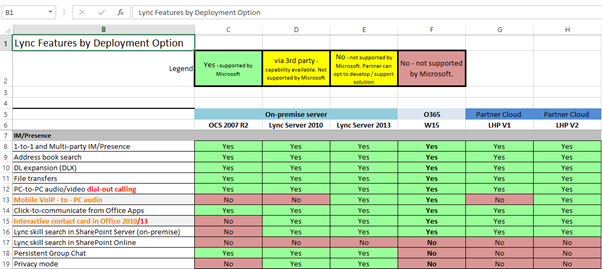
Microsoft has released an overview with the features and functionality that are supported (either by Microsoft or by a 3rd party vendor) or not supported in OCS, Lync 2010/2013 On-Premises and Lync Hosting Pack v1 and v2.

One remark: “Not Supported” can mean either “This does not work”, or it can mean “This is not tested by Microsoft, therefore it is not supported”. The latter is often the case and with some tweaking and tuning stuff can be made working with the Lync Hosting Pack.

image

You can find this overview on the Microsoft Partner site: https://mspartner.microsoft.com/en/us/pages/solutions/downloads/lync-features-by-deployment-matrix.aspx

Lync Hosting Pack v1 is available via the Microsoft Volume License site and is targeted towards hosting partners only. Lync Hosting Pack v2 is not available yet, but should be in the 2nd of June 2013.

Office Web Apps 2013

An additional application next to Exchange Server 2013 is a new server product called Office Web Apps 2013. The Office Web Apps server can be used to render Microsoft Word, Excel and Powerpoint file types. Other than this the Office Web Apps server is used by Exchange Server 2013 to provide the Web Ready Document Viewing, something that was made available by Exchange Server 2010 natively (although a non-Microsoft engine was used to achieve this).

Installing Office Web Apps 2013

Office Web Apps 2013 can be installed on Windows Server 2012 or on Windows Server 2008 R2, but I prefer the first (due to support lifecycle). If you plan to use the latter make sure that you install the .NET Framework 4.5 and Powershell 3.0, these are installed by default on Windows Server 2012.

Continue reading Office Web Apps 2013

TechEd North America 2013 Sessions

TechEd North America 2013 was held from June 3 – 6, 2013 in New Orleans. It was a great event with lots of great sessions. I was there as well to present two sessions (Get Your Mailbox Moving and Exchange in the Cloud. Afraid of losing your job?) but unfortunately had to leave on the first day due to personal circumstances back home. Kay Sellenrode (MCM Exchange 2007/2010 and MCA) took over these sessions successfully though.

I have made a selection of all Exchange related sessions and some Office 365 sessions where Exchange or Hybrid is involved. Happy viewing!

Day one – Monday June 3

Day two – Tuesday June 4

Day three – Wednesday June 5

Day four – Thursday June 6

For a complete overview (and selection) of all sessions delivered at TechEd North America 2013 please visit the Channel 9 MSDN site at http://channel9.msdn.com/Events/TechEd/NorthAmerica/2013#fbid=WYqwn0iOxi6

Exchange 2003 The server cannot be removed because…

While uninstalling Exchange Server 2003 (after a successfull migration to Exchange Server 2010) I ran into the dreaded “The server cannot be removed because” issue:

The server <servername> cannot be removed because:

– One or more users currently use a mailbox store on this server. These users must be moved to another mailbox store on a different server or be mail disabled before uninstalling this server.

Facility: Exchange System Manager

ID no: c103f492

image

Continue reading Exchange 2003 The server cannot be removed because…