Tag Archives: Directory Synchronization

User cannot logon to Office 365 after moving user account in Active Directory

When you have implemented Directory Synchronization between your on-premises Active Directory and Office 365, and you move a user in Active Directory out of the DirSync scope (for example to an Organizational Unit that’s not synchronized) the user is removed from Office 365.

However, when you move the user back to an Organizational Unit that’s synchronized (i.e. in-scope) the password is no longer synchronized. So, when this user tries to logon to Office 365 services, the logon attempt fails. Only when you change the password in Active Directory, the new password is synchronized to Office 365, and the user is able to logon again to the service.

Very similar to this, when a disabled user in the on-premises Active Directory is enabled, the password is not synchronized to Office 365.

This is a known issue with DirSync or Azure AD Connect (up to November 2015). On November 4, 2015 Microsoft released a new version of Azure AD Connect that fixes this particular issue (together with a number of other fixes of course).

You can find more information regarding the updated version of Azure AD Connect on Sander Berkouwer’s blog A new version of Azure AD Connect was released today. You can download the new version of Azure AD Connect on the Microsoft Download Site.
Implementing Directory Synchronization

Updated: November 11, 2015,
Updated: April 20, 2018

In an earlier blog I explained the differences between Cloud Identities, Linked Identities and Federated Identities. The source of authority (i.e. where the accounts are managed) for Cloud Identities is Microsoft Online and for Linked and Federated Identities the source of authority is your on-premises Active Directory. To get these accounts in Azure Active Directory (Office 365) you have to setup a directory synchronization between Active Directory and Azure Active Directory.

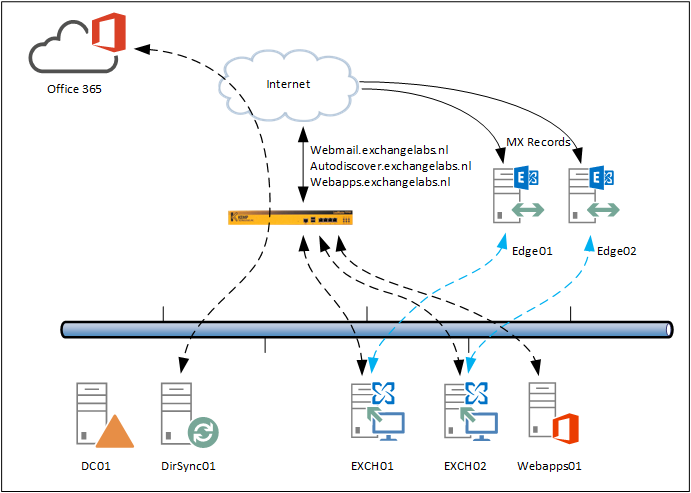
As explained earlier I prefer to use a dedicated DirSync server instead of installing DirSync on your Domain Controller (which is possible and supported). When using a dedicated DirSync server, you can keep your Domain Controllers identical and work on your Domain Controllers while not affecting your DirSync server. We now will build a configuration like this:

Implemented DirSYnc server

There are two options when setting up Directory Synchronization between your on-premises Active Directory and Windows Azure Active Directory:

  • DirSync as a tool that can be downloaded from the Microsoft Online Portal. This is the ‘original’ DirSync tool which can be installed on a Domain Controller or on a dedicated DirSync server. This tool will be decommissioned somewhere in the (near) future.
  • Microsoft Azure Active Directory (WAAD) Sync Services, the new DirSync tool that can be downloaded from http://www.microsoft.com/en-us/download/details.aspx?id=44225. This tool has the option to synchronize a multi-forest topology with one tenant in Office 365.

Note. On June 24, 2015 Microsoft has released the Azure AD Connect & Connect Health. Azure AD Connect is the latest version of the Directory Synchronization. This blog is based on the previous Azure AD Sync, but I strongly recommend you look into the Azure AD Connect tool (there are a lot of similarities) which you can download from the Download center.

Added note on April 20, 2018. Azure AD Connect is now the only supported version for implementing directory synchronization. It is updated on a regular basis and available via the Azure AD Connect download. If you perform a default installation, Azure AD Connect will automatically update itself when a new version is available.

Continue reading Implementing Directory Synchronization