I’ve been installing Exchange 2013 in my lab environment recently. For Exchange I use a System- and Bootdisk and a Mailbox database disk in my lab. Sometimes I add a small disk to the server where the SMTP transport files are located, but this is always added after Exchange is installed.
Recentely I created a template where the C:\ (System- and Boot), D:\ (SMTP files) and F:\ (mailbox database) are already present BEFORE Exchange 2013 is installed.
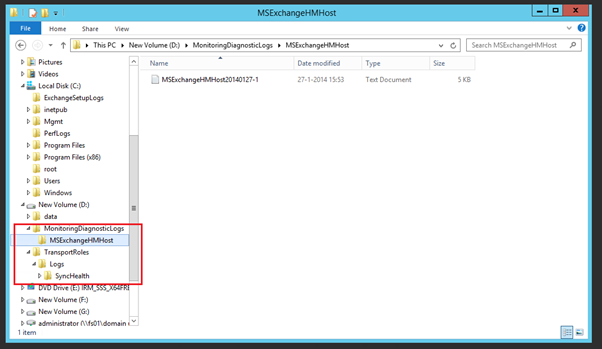
Now what happens is that two additional directories are created on this D:\ drive during installation of Exchange 2013:
- D:\MonitoringDiagnosticLogs\MSExchangeHMHost
- D:\TransportRoles\Logs\SyncHealth. A small file is located in here called MSExchangeHMHost20140127-1 (that last part is the data the file is created)

It turns out that this is hardcoded in the setup application of Exchange 2013. I’ve received one email from somebody who saw this in Exchange 2010 CU3 as well, so most likely it happened earlier as well.
Since it is hardcoded, it happens only on drive D:\. If drive D:\ is your DVD player and the additional disk is E:\ the directories are not created.
This bug is filed at the Exchange team, now we have to wait what happens.

 Jaap Wesselius
You must be logged in to post a comment.