Tag Archives: Exchange 2010

Empty a mailbox using Exchange Web Services

Currently I’m working on an environment where 6,000 test mailboxes are created. During test migrations all kinds of information is stored in these mailboxes. You can use Exchange Web Services to empty these mailboxes.

To empty the (test) mailboxes you need the following:

  • Exchange Web Services Managed API;
  • An account with enough permissions to empty the mailboxes;
  • A script that does the actual plumbing.

The Managed API can be downloaded from the Microsoft website: http://www.microsoft.com/download/en/details.aspx?id=13480 and it runs on Windows 7 clients or Windows 2008 (R2) servers.

The script will logon to the mailboxes with an account that needs sufficient permissions. You can set the permissions on the Exchange CAS Server using the following commands:

Continue reading Empty a mailbox using Exchange Web Services

Exchange 2010 Hosting mode revisited

I already blogged earlier about the multi-tenant hosting possibilities in Exchange 2010 SP1 when using the /hosting switch during installation. This provides a true multi-tenant Exchange 2010 environment but lacks quite an amount of functionality, like Public Folders, the Unified Messaging Role, Lync Server 2010 multi-tenant integration (although an update on this is expected later this year) and provisioning difficulties. You can read my two earliers blog post on Exchange 2010 hoster edition and Exchange 2010 SP1 hosting & Control Panel. Although it is doable, it is difficult at the same time.

With the upcoming Service Pack 2 for Exchange 2010 there’s nothing new with respect to the Hoster Edition, but for a normal installation (also referred to as on-premises installation) a new feature called Address Book Policies (ABP) will be presented. The new ABP feature is the successor of the Exchange 2007 Address List Segregation (which is not supported in Exchange 2010 since it might horribly break Exchange 2010). This makes it easier for non hosting customers to implement multiple address lists without using the /hosting switch (please remember you need to be a registered hoster to officially use the hoster edition of Exchange 2010 SP1).

Continue reading Exchange 2010 Hosting mode revisited

Disclaimers in Exchange 2010

Using Transport Rules in Exchange Server 2010 you can add fancy disclaimers to your outgoing e-mail messages.

Transport Rule information is stored in Active Directory and shared between all Hub Transport servers in the organization. This way a consistent behavior can be achieved.

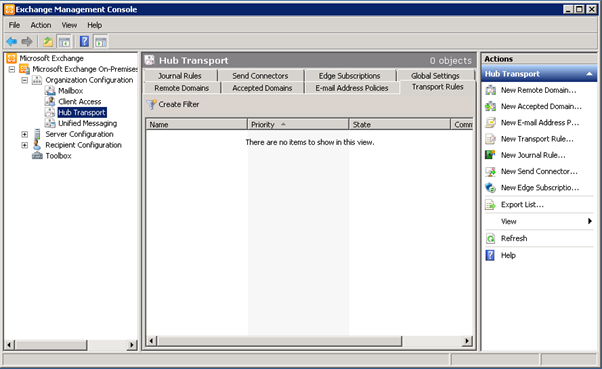
To create a Transport Rule that appends a disclaimer open the Exchange Management Console, navigate to the Organization Configuration Container and select the Hub Transport Container.

image

Continue reading Disclaimers in Exchange 2010

Exchange 2010 and your own PKI infrastructure

When it comes to Exchange Server 2007 or Exchange Server 2010 it is a best practice to use a real world SSL certificate for the Client Access Server. In Microsoft knowledge base article 929395 (http://support.microsoft.com/kb/929395) four vendors are listed as supported vendors for SSL certificates. Of course there are more, and their certificates work fine, but you can also use an internal Windows Server 2008 Certificate Services environment. Especially when you have only domain joined clients this shouldn’t be a problem…

Client Access Server and Certificates

When installing the Exchange Server 2010 Client Access Server, a self-signed certificate, containing just the server name, is generated and installed on the server, and can be used for testing purposes after installing the server. For testing purposes this self-signed certificate also contains the local FQDN in the “Subject Alternative Names” field for testing with Outlook Anywhere. It is naturally a best practice not to use this self-signed certificate in a production environment, but rather to use a third party certificate on the Client Access Server.

Continue reading Exchange 2010 and your own PKI infrastructure