Category Archives: Exchange

TrendMicro Hosted Email Security: SPF DKIM and DMARC Part I

A couple of years ago I have been working with the TrendMicro Hosted Email Security (HES) solution and I was very satisfied with it. With the upcoming SPF, DKIM and DMARC awareness I was looking for online solutions that offer this kind of security measures and I found that HES now offers these solutions as well.

I have a hybrid Exchange environment with multi-role Exchange 2010 servers, Exchange 2010 Edge Transport servers and a hybrid configuration. There’s no dedicated Exchange 2016 server for this, the hybrid configuration just uses the existing Exchange 2010 servers. And this works well. There’s an additional namespace o365mail.inframan.nl, this is used solely for SMTP communication between Exchange Online and the on-premises Exchange 2010 servers (without the use of the Edge Transport servers). The configuration looks like this:

image

This a hybrid configuration with a centralized mailflow. All email is sent and received through the on-premises Exchange environment, including email from and to Office 365. So, email sent to the internet by users in Office 365 are sent first to the Exchange 2010 servers, and then via the Edge Transport servers to the Internet. This way you have full control over your Internet mail flow.

The Edge Transport servers don’t do a great job when it comes to message hygiene. You can configure Realtime Block Lists (RBL) like Spamhaus, configure content filtering using word lists and attachment filtering, but still (a lot of) spam ends-up in the user’s mailboxes. Therefore 3rd party solutions like Cisco Email Security Appliance (ESA, formerly known as IronPort) are used in front of on-premises Exchange solutions

Continue reading TrendMicro Hosted Email Security: SPF DKIM and DMARC Part I
Your browser is currently set to block JavaScript

I hate this…. And most likely you too otherwise you didn’t end up here

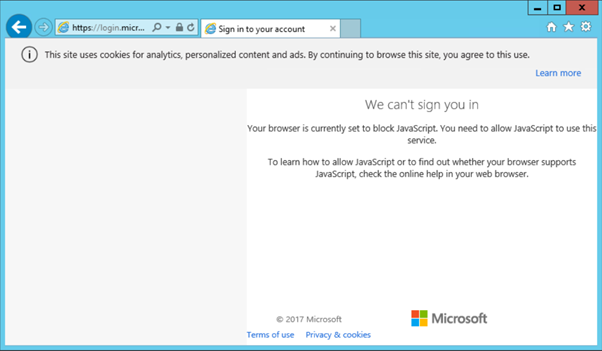
When logged on to an Exchange server, ready for starting the Hybrid Configuration Wizard, you try to logon to Exchange Online you end up with a warning (or ‘error’) message:

We can’t sign you in

Your browser is currently set to block JavaScript. You need to allow JavaScript to use this service.

To learn how to allow JavaScript or to find out whether your browser supports JavaScript, check the online help in your web browser.

Like the screenshot below:

image

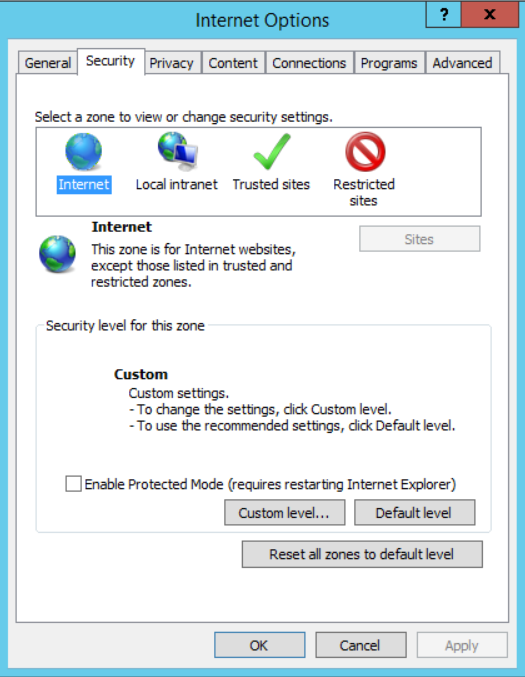
To enable JavaScript on your computer you have to enable Active Scripting. To do so, go to Internet Options, select the Security tab and choose Custom Level.

image

image

Now scroll all the way down (or press page down 12 times ) and enable Active Scripting:

image

You will get a warning message “Are you sure you want to change the settings for this zone”, click Yes and click OK.

image

Restart your Internet Explorer browser and you can login on Exchange Online and continue with the Hybrid Configuration Wizard (or whatever you were trying to achieve).

Exchange 2016 CU7 and Exchange 2013 CU18

Microsoft has released its quarterly updates for Exchange:

  • Exchange 2016 CU17.
  • Exchange 2013 CU18.

It has been quiet around these updates, and they do not bring a whole lot of features.

Important to note is that the minimum Forest Functional Level (FFL) has been raised to Windows Server 2008 R2. Personally I think this is an indication that more exciting stuff is along the way, especially around Exchange 2016 (my personal expectation, don’t shoot the messenger :-))

There are schema changes in Exchange 2016 CU7, so when installing this update you have to execute the following commands:

Setup.exe /PrepareSchema /IAcceptExchangeServerLicenseTerms
Setup.exe /PrepareAD /IAcceptExchangeServerLicenseTerms
Setup.exe /PrepareDomain /IAcceptExchangeServerLicenseTerms

When it comes to the .NET Framework, Microsoft is working on a new .NET Framework release (version 4.7.1). The upcoming quarterly update of December 2018 will support this version of the .NET Framework.

More information (well, not a lot more) can be found here: https://blogs.technet.microsoft.com/exchange/2017/09/19/released-september-2017-quarterly-exchange-updates/


Exchange 2013 Mailbox database Disaster Recovery

In Exchange 2010 Microsoft introduced the Database Availability Group to implement redundancy on mailbox server level and mailbox database level. If a mailbox database (or a server) fails, another one can take over. This concept is carried forward into Exchange 2013 and Exchange 2016 and has improved ever since.

There are still customers that do not use a Database Availability Group and rely on a single server and a solid backup software solution. A backup of the mailbox database is created every night and this continue to run for years. You hope. Until disaster strikes…..

image

I got a call earlier today from a customer. He has been patching his Hyper-V host, and after a reboot his Exchange 2013 server didn’t come up properly. Well, after questioning it turned out that the Exchange server booted correctly, but that only one of three Mailbox databases mounted properly. So, two Mailbox databases (approx. 250 GB in size) seem to be corrupt and this is where the pain begins.

To ‘resolve’ the issue the customer tried to reboot the box again, tried to restore the databases from backup, tried a ‘soft repair’ and tried a ‘hard repair’. No idea what the latter are by the way, but that was according to the customer. But if you know anything about Mailbox databases in Exchange, then you also know that most destruction happens in the first 15 minutes!

If you rely on a single server and a backup solution for restoring services or a disaster recovery scenario you have to know the basics of Exchange database technology. Know what a mailbox database is (except for a large .edb file), know what transactional logging is and how the mailbox database, the transaction log file and the checkpoint file relate to each other. And related to this, it is of utmost importance that you know how to replay transaction log files into a Mailbox database.

Although old, these are good starting points:

Furthermore, you have to know how your backup solution works, and how to restore mailbox database into a production environment. There are streaming backups, but these are rare these days and VSS snapshot backups. You can find more detailed information in the following articles:

Besides the technical knowledge about the Mailbox database technology you have to perform regular ‘fire drills’. Restore a Mailbox database into production, restore using a recovery database, perform replaying of transaction log files, get your hands on ESEUTIL and see what the /G, /K, /P and /R are doing. It will save you a considerable amount of time when you know the technology and the tools, it will reduce risk of data loss and you are able to give a proper planning to your users/manager/customer when the mailboxes are available again.

If you don’t know this you’re playing with fire, and it will backfire to you, believe me!

A reboot is required to complete file operations on ‘exchangeserver.msi’

I already mentioned this in my blogpost about Exchange 2016 CU6 and Exchange 2013 CU17, but when upgrading an existing Exchange 2016 server to Exchange 2016 CU6, the setup application stops after step 5, 6 or 7 (random) with the following error message:

“A reboot is required to complete file operations on ‘E:\exchangeserver.msi’. Reboot the machine, and then run setup again”

image

After rebooting and restarting the setup application the upgrade finishes successfully.

Rebooting the Exchange 2016 server prior to starting the upgrade process does not prevent this from happening. Also, there’s no difference between Exchange running on Windows 2012 R2 or Windows 2016.

The installation process has been tested by Microsoft and TAP customers, and tests are still conducted. It is somewhat clear what the root cause is for this issue, it is an MSI package that’s causing this issue. Please be aware that the Microsoft setup application executes around 200 MSI packages, and if only one MSI package is having difficulties you can see issues like this. Because of the number of MSI packages it is not possible to check in advance if your server will experience this issue.

At this moment the only solution is to reboot the server when requested and restart the application program.