Tag Archives: Exchange 2013

Installing MS13-061 breaks CI on Exchange Server 2013

Preliminary information and subject to change! Will update when more information becomes available.

When installing MS13-061 on Exchange Server 2013 CU1 or CU2 issues with the Content Indexing (can) occur. Content Indexing for Mailbox Databases are in a failed state and the existing “Microsoft Exchange Search Host Controller” seems to be missing. Instead there’s a new service called “Host Controller Services for Exchange” on the box.

Right now it looks like it doesn’t affect Exchange Server 2007 or Exchange Server 2010.

There’s a workaround to get this fixed:

Open the Registry Editor and navigate to the following path:

“HKEY_LOCAL_MACHINE\SOFTWARE\Microsoft\Search Foundation for Exchange”

Go to the DataDirectory string and give it the following value:

C:\Program Files\Microsoft\Exchange Server\V15\Bin\Search\Ceres\HostController\Data

image

Note. If your Exchange binaries are in a different directory use change the path accordingly.

In the registry navigate to the following location:

“HKEY_LOCAL_MACHINE\SYSTEM\CurrentControlSet\Services\HostControllerService”

Change the value of “DisplayName” to “Microsoft Exchange Search Host Controller”

Add a new Multi-String Value named “DependOnService” and specify “http” in Value data.

image

The display name will only be changed after a reboot of the server, but the services can be started at this point.

Upgrade to Exchange Server 2013 RTM CU2

Now that Microsoft has released Exchange Server 2013 RTM CU2 it’s time to have a closer look at installing this Cumulative Update.

In contrast with the previous Update Rollups as we’ve seen in Exchange 2007 and Exchange 2010, which were only a set of hotfixes bundled together, a Cumulative Update is a full version of the product. So, it is now possible to install an Exchange 2013 server from scratch using the CU2 download.

Another advantage of a CU is that Microsoft can bundle new functionality into the product, even Schema changes are possible (as a matter of fact CU2 does include a number of Schema changes) but also the Configuration container in Active Directory can be changed.

Continue reading Upgrade to Exchange Server 2013 RTM CU2

Exchange Server 2013 RTM CU2

On July 9th Microsoft has released Cumulative Update 2 for Exchange Server 2013 RTM. Besides a large number of (undisclosed) fixes there are several enhancements in CU2:

  • Per-server database support – The maximum number of Mailbox databases has been raised from 50 up to 100. The Exchange Server 2013 Server Role Requirements Calculator also has been updated with this information;
  • OWA redirection – CU2 introduces a single sign-on experience when using Forms Based Authentication (FBA) which is great in a coexistence scenario;
  • High Availability – Exchange 2013 RTM CU2 introduces a new service, the DAG Management Service. The DAG Management service contains non-critical code that used to reside in the Replication service. This change does not introduce any additional complexities in event reporting, either – events are written into the Application event log with the source of MSExchangeRepl and crimson channel;
  • Managed Availability -In addition to improvements in various probes and monitors, there have been changes to the responder throttling framework. Prior to Exchange 2013 RTM CU2, many responders were only throttled per-server (e.g., RestartService). Now, these responders are throttled per group ;
  • Cmdlet help -Exchange 2013 RTM CU2 introduces the capability for administrators to get updates to Exchange Management Shell cmdlets without needing to deploy a new service pack or cumulative update. Administrators can launch the Exchange Management Shell and run the Update-ExchangeHelp cmdlet to update their local Shell help ;
  • OWA Search improvements;
  • Malware Filter Rules -Exchange 2013 RTM CU2 introduces the –MalwareFilterRule cmdlets. You can use the –MalwareFilterRule cmdlets to apply custom malware filter policies to specific users, groups, or domains in your organization. Custom policies always take precedence over the default company-wide policy, but you can change the priority (that is, the running order) of your custom policies;

Setup.exe /PrepareSchema /IAcceptExchangeVersionLicenseTerms

The configuration partition in Active Directory has also been changed to reflect changes (additions) in RBAC. To update the configuration partition you can use the following command:

Setup.exe /PrepareAD /IAcceptExchangeVersionLicenseTerms

Please note that with the new Service Model from Microsoft the Cumulative Updates are now a full product with a normal setup application. CU’s will now be released on a quarterly basis. A very important yet dangerous aspect of a full product is that an upgrade will overwrite custom settings on the ‘old’ Exchange Server 2013 server. A common example of this is OWA customization. Also, there’s no roll back model. If you’re not satisfied with the latest CU there’s no way to uninstall and revert to a previous version.

As with all major changes please perform an upgrade first in a test environment and evaluate CU2 appropriately.

These are the Release Notes, the Exchange Product Group announcement can be found here and the download can be found on the Microsoft download site.

Exchange 2013 coexistence, EAC and ECP

When you introduce Exchange 2013 into an existing Exchange 2010 environment and you want to open the Exchange Admin Center (using https://localhost/ecp or using https://webmail.contoso.com/ecp) it ‘fails’ and it opens the Exchange 2010 ECP instead.

image

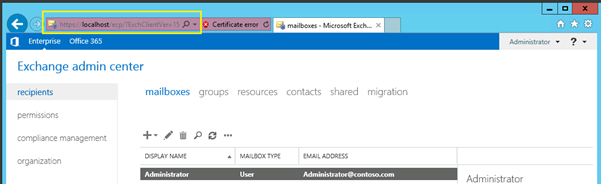
This is caused by the fact that the administrator mailbox is still on Exchange 2010 and the ECP is tied to the administrator mailbox. You can move the mailbox to Exchange 2013 but instead you can also add the suffix /?ExchClientVer=15, like this https://localhost/ecp/?ExchClientVer=15

This will open the Exchange Admin Center in Exchange 2013 while the administrator mailbox is still on Exchange 2010:

image

Released: Exchange 2013 RTM CU1

Today, April 2nd 2013 Microsoft released Cumulative Update 1 (CU1) for Exchange Server 2013 RTM. CU1 is an important release since it offers the possibility to integrate with an existing Exchange Server 2007 or Exchange Server 2010 environment (this was not possible using the original Exchange Server 2013 RTM release). The official version of CU1 is build 620-29.

Furthermore there are many, many bugfixes in CU1 (several thousands, but these also include typo’s and language issues) but also some new additional features:

  • Address Book Policy Routing Agent – especially important for hosting environments. For more information regarding this check out Address Book Policies, Jamba Jokes and Secret Agents;
  • Group membership management by groups – a long awaited feature that was also available in Exchange Server 2007 and earlier;
  • Access to Public Folders via favorites;
  • Exchange Admin Center (EAC) enhancements;
  • Improved probes, monitors and responders (part of managed availability);
  • Optimized Get-HealthReport;
  • Exchange 2013 Management Pack for SCOM;
  • Auto-reseed supports bitlocker encrypted disks;

CU1 is the first update as part of Microsoft’s new servicing model. This means that CU1 is approx. 1.3 GB in size, it is not an update on top of Exchange Server 2013 RTM but it’s a full version. When deploying there’s no need to install Exchange Server 2013 RTM first, you can start directly with deploying CU1.

For more information check out the Release Notes on http://blogs.technet.com/b/exchange/archive/2013/04/02/released-exchange-server-2013-rtm-cumulative-update-1.aspx or download CU1 directly from the Microsoft download site: http://www.microsoft.com/en-us/download/details.aspx?id=38176

Please note that a Cumulative Update is not the same as a Service Pack. Microsoft will release a CU on a regular basis, most likely four times a year (once every quarter). For Exchange Server 2013 Microsoft is planning to release Service Pack 1 (SP1), but no information is available at the time of writing.