All posts by jaapwesselius

Using a Kemp Load Balancer for Reverse Proxy with Lync 2013

In my previous blog I wrote about publishing Lync services using IIS/ARR as a replacement for TMG 2010. It is also possible to use a hardware load balancer to publish these Lync web services to the internet. In this blog I’ll talk about using a Kemp LoadMaster LM2600 for publishing Lync web services.

Lync Configuration

In my lab I have a Lync 2013 Enterprise Edition, in the perimeter network I have a Lync 2013 Edge Server, but instead of IIS/ARR I now have a hardware load balancer.

Continue reading Using a Kemp Load Balancer for Reverse Proxy with Lync 2013

Using ARR for Reverse Proxy with Lync 2013

In an earlier blog post I wrote about publishing Lync services using TMG 2010. One of the Microsoft alternatives for reverse proxy is the Application Request Routing module or ARR, a module that’s running on top of Internet Information Server (IIS).

Lync Configuration

In my lab I have a Lync 2013 Enterprise Edition, in the perimeter network I have a Lync 2013 Edge Server, but instead of a TMG I now have an IIS/ARR server.

Continue reading Using ARR for Reverse Proxy with Lync 2013

Lync Webinar 12 maart 2014

Op 12 maart 2014 heb ik mijn eerste Lync presentatie gegeven, en ook nog in het Nederlands. Dat laatste was wel prettig. Ook de eerste keer voor mij in het Nederlands.

image

De presentatie ging over Load Balancing Lync 2013 (georganiseerd door Kemp) en gezien de reacties ging het niet slecht. Zelf heb ik wel een aantal punten waar nog wat aandacht aan besteed moet worden (bijvoorbeeld ‘draining’) maar dat komt in een toekomstige blog wel.

De vervolgstappen zijn een algemene Load Balancing presentatie en een presentatie over Load Balancing Exchange 2013. Gezien de hoeveelheid mensen die aangemeld (en aanwezig!) waren worden beide presentaties weer in het Nederlands gehouden.

Heb je nog aanvullende vragen of onderwerpen voor een toekomstige blog, je kan me vinden op Twitter via @jaapwess of mail me op mail[at]jaapwesselius.com.

De presentatie is hier te downloaden: https://jaapwesselius.com/wp-content/uploads/2014/10/lyncwebinar-12maart2014.pdf

Move Transport Database in Exchange 2013

When designing an Exchange 2013 environment I always recommend using an additional disk to store the Transport Database and accompanying transaction log files to a separate disk. When things with SMTP get out-of-control and the Queue database grows too much your boot- and system disk do not fill up.

The Exchange Transport Configuration is stored in a CONFIG file called EdgeTransport.exe.config which is stored in the C:\Program Files\Microsoft\Exchange Server\V15\Bin directory.

Continue reading Move Transport Database in Exchange 2013

load balancing in Exchange 2013 SP1 with F5

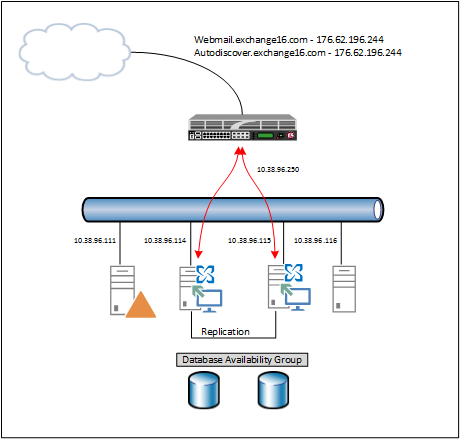
In my previous blog I wrote about the new SSL offloading capabilities in Exchange 2013 SP1. In this blog I will explain how to use this with a load balancer. In my lab environment I’m using an F5 (virtual) LTM running on Hyper-V. My lab is configured as shown in the following figure:

image

Continue reading load balancing in Exchange 2013 SP1 with F5