Tag Archives: LTM

Using an F5 LTM Load Balancer for Reverse Proxy with Lync 2013

Ok, I couldn’t resist it… In my previous blog I wrote about publishing Lync services using a Kemp Load Master. Since I’m not married to Kemp (although you might think differently, and so does Marco 😉 I also have an F5 LTM up-and-running in my lab. Time to have a closer look at the F5 when it comes to reverse proxy with Lync 2013.

Lync Configuration

Again, in my lab I have a Lync 2013 Enterprise Edition, in the perimeter network I have a Lync 2013 Edge Server, but I will use an F5 LTM load balancer.

Continue reading Using an F5 LTM Load Balancer for Reverse Proxy with Lync 2013 →
load balancing in Exchange 2013 SP1 with F5

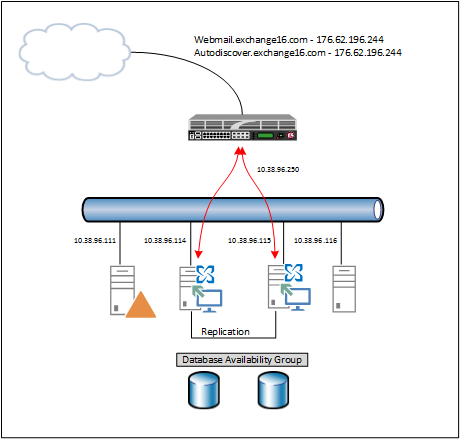
In my previous blog I wrote about the new SSL offloading capabilities in Exchange 2013 SP1. In this blog I will explain how to use this with a load balancer. In my lab environment I’m using an F5 (virtual) LTM running on Hyper-V. My lab is configured as shown in the following figure:

image

Continue reading load balancing in Exchange 2013 SP1 with F5 →

SMTP load balancing with F5 LTM

In my previous blog I explained how to configure the F5 LTM for use with Exchange 2010 CAS servers. To do this properly it is recommended to use a template (iApp) because of the amount of work (and thus complexity).

Load balancing SMTP is much easier. The only things that need to be configured are:

  • Service Monitor for monitoring the SMTP service on the Exchange 2010 Hub Transport Servers;
  • A Pool containing the Exchange 2010 Hub Transport servers;
  • A VIP for the SMTP service with a listener on the public network.

To create a new Service Monitor select the Local Traffic and click the + symbol next to monitors. Give the new monitor a name like SMTP_Monitor and if needed adjust the service health monitoring interval. Continue reading SMTP load balancing with F5 LTM →

Load Balancing Exchange 2010 with F5 LTM

In a earlier blogpost on load balancing Exchange 2010 I explained how to achieve this with a Kemp Loadmaster. In this blogpost I’d like to demonstrate how to configure this with an F5 Local Traffic Manager (LTM). This is actually part I of what I’ve demo’ d in the MEC 2012.

The configuration looks like this. There are two multi-role servers configured with a Database Availability Group (DAG). There’s a File Share Witness (FSW) configured on server FS01. The F5 itself is installed in a two arm configuration, so the VIP for the clients is on a different subnet then the Exchange Server.

image

Continue reading Load Balancing Exchange 2010 with F5 LTM →