Updated: November 11, 2015
In a series of blog posts we will create an Exchange hybrid environment, where the on-premises environment consists of Exchange 2013 multi-role servers. Creating such an environment consists of several steps:
- Implementing Directory Synchronization.
- Running the Hybrid Configuration Wizard.
- Creating Migration Endpoints.
- Moving Mailboxes to Exchange Online.
Current Infrastructure
The current infrastructure consists of two Exchange 2013 multi-role servers and two Exchange 2013 Edge Transport servers, all of which are fully patched and running the latest version of Exchange 2013 (i.e. Exchange 2013 CU8). An Office Web Apps 2013 servers is also involved for rendering attachments in Outlook Web App.
A Kemp LM3600 LoadMaster is used for distributing incoming client requests from the Internet across both servers. SMTP is directed to two Exchange 2013 Edge Transport servers, which are subscribed to the internal Exchange 2013 servers, as shown in Figure 1.
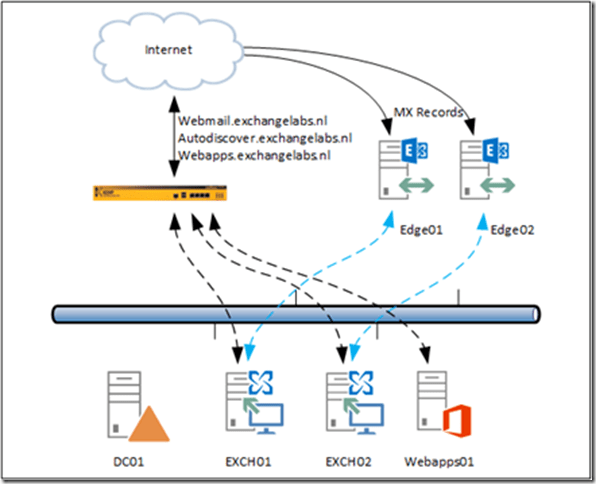
Figure 1. The starting point when creating a new Hybrid environment.
In Office 365 we have are using a tenant called ExchangeLabsNL, for Exchange Online the tenant name is not important, but for SharePoint Online it is important. The corresponding SharePoint Online environment is accessible via Exchangelabs.nl.sharepoint.com, so the tenant name is important after all.
Note. The tenant name cannot be changed later on, so don’t choose any silly names for your tenant. One day you will regret this.
Directory Synchronization Server
In our on-premises environment we are going to install a dedicated Directory Synchronization server. This is not really a hard requirement since DirSync can be installed on a Domain Controller as well. Personally I prefer to use a dedicated DirSync server and keep all Domain Controllers identical.
Exchange Hybrid Server
There’s a lot of confusion about the Exchange Hybrid server when creating an Exchange Hybrid environment and to be honest, it took quite some time for me as well to get rid of the confusion.
A true hybrid server does not exist, but in Microsoft terminology, the hybrid server is the Exchange server where the Hybrid Configuration Wizard (or HCW) is run to configure a Hybrid Configuration. And the Hybrid Configuration is nothing more than some information written in Active Directory so it can be easily found and used by all Exchange servers in the organization. In Figure 1, the hybrid server can be either server EXCH01 or server EXCH02.
An additional Exchange 2013 server can be added as a hybrid server. You can even use a dedicated FQDN like hybrid.contoso.com for this to separate SMTP and migration traffic from/to Office 365 form regular client traffic accessing the normal Exchange servers EXCH01 and EXCH02.
Free/busy information in this scenario for example is not using the dedicated hybrid server, since it is not possible to designate this kind of traffic to dedicated servers. When users in Exchange Online are creating new meetings with users in Exchange on-premises, the free/busy information is found using the normal Exchange EWS virtual directory. This information in turn is found using normal Autodiscover requests.
So, before you start building your Exchange Hybrid environment you have to make absolutely sure your starting point is working flawlessly, internally and externally. If you run into issues with AutoDiscover, free/busy, out-of-office or Certificate errors you have to fix these first before continuing with the hybrid configuration. One great tool to test your existing environment is the Remote Connectivity Analyzer (www.testexchangeconnectivity.com) and of course your own Outlook clients 
Note. If you are running Exchange 2010 you can also use the existing Exchange 2010 servers to create a hybrid environment without adding Exchange 2013 servers (although you have to be absolutely sure about this, Exchange 2010 is no longer in mainstream support). If you want to use Exchange 2013 in your existing Exchange 2010 environment you have to start a coexistence project first. When this is fully functioning (without error of course) you can continue with the DirSync and hybrid configuration.
When all is running fine you can continue with implementing the DirSync solution, as outlined in the following blogpost: https://jaapwesselius.com/2015/05/13/implementing-directory-synchronization/


 Jaap Wesselius
You must be logged in to post a comment.