All posts by jaapwesselius

Move mailboxes using MigrationWiz

If you don’t want to use the standard Microsoft tools for migrating Mailboxes to or from Exchange Online you have to use a 3rd party solution. One online solution is MigrationWiz from BitTitan. There are a number of advantages of using MigrationWiz over the standard Microsoft tools, especially when using a Cutover Exchange Migration (CEM) or a Staged Exchange Migration (SEM). A Cutover Exchange Migration is basically a big bang scenario where you switch all services at the same time and gradually migrate all the Mailbox content. There’s no way to schedule anything here and this is much better when using MigrationWiz.

MigrationWiz is using Exchange Web Services to login to your on-premises Mailbox and to your online Mailbox to move all the content between the two platforms.
Continue reading Move mailboxes using MigrationWiz

Auto-forward in Office 365

A customer is running Exchange 2010 on-premises and has auto-forwarding of email messages disabled on an organizational level. After building a hybrid environment and migrating some users we found out that users were able to auto-forward email messages to external recipients.

In Office 365 auto-forward is enabled by default on an organizational level, but can be disabled on a tenant level by using Transport Rules. To achieve this, logon to the Exchange Admin Center of Office 365 (https://outlook.office365.com/ecp/) and select Rules in the Mail Flow section.

Continue reading Auto-forward in Office 365

We’ve run into a problem with your Office 365 subscription

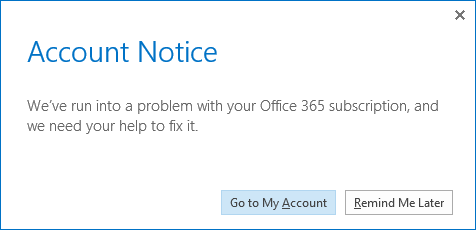
After moving some Mailboxes from Office 365 to Exchange 2013 on-premises and disabling licenses in the Office 365 portal I got the following warning on my computer (laptop and workstation):

Account Notice

We’ve run into a problem with your Office 365 subscription, and we need your help to fix it.

image

Continue reading We’ve run into a problem with your Office 365 subscription

Configure disks using PowerShell in Windows 2012 R2

When installing and configuring a large Exchange environment you most likely will have a lot of disks attached to the Exchange servers. Manual configuration of the disks is no fun so PowerShell is your friend here.

These are the steps that need to be done:

  • Create directory structure for the Mount Points (New-Item).
  • Set the disks online and initialize them (Initialize-Disk).
  • Create the partitions (New-Partition).
  • Link them into the Mount Point structure (Add-PartitionAccessPath)
  • Format them (Format-Volume).

Continue reading Configure disks using PowerShell in Windows 2012 R2

Cluster Administrative Access Point and Database Availability Group

One of the new features in Windows Server 2012 R2 to decrease complexity is the so called Active Directory detached cluster. This is a regular Failover Cluster, but without a computer account in Active Directory. So, when deploying the Failover Cluster there’s no need to pre-create the Computer Name Object (CNO) anymore, but please note that the individual Cluster nodes still need to be a member of the Active Directory domain though.

Since the CNO is no longer available in an Active Directory detached cluster, the Cluster Administrative Access Point (CAAP) is not available either and in turn this cluster AAP was used by the Failover Cluster Management to access and manage the cluster. Since the cluster AAP is no longer available this is also referred to as an AAP-less, cluster AAP-less or CAAP-less cluster.

Continue reading Cluster Administrative Access Point and Database Availability Group