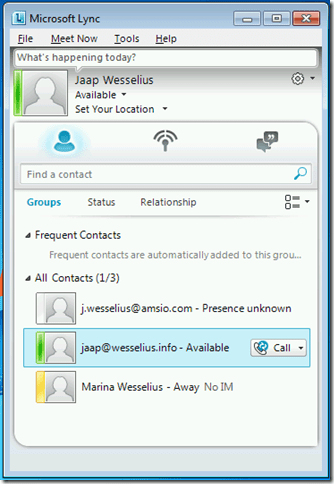
In my lab environment I noticed that my Lync (2010) client does not show the availability for all contacts. In this screenshot I can see the status of my personal Lync account (running on my laptop) and the status of my wife’s account (running on a Polycom CX600). My work account however keeps whining about “Presence unknown”.
Federation traffic goes through the Lync Edge servers. When looking at the eventlog of the Lync Edge servers in my test environment (Lync 2013 with Lync Hosting Pack v2 – running on Windows Server 2008 R2) I can see the following entry:
Log Name: Lync Server
Source: LS Protocol Stack
Date: 3-9-2013 9:10:55
Event ID: 14428
Task Category: (1001)
Level: Error
Keywords: Classic
User: N/A
Computer: LYNC-EXT01.contoso.com
Description:
TLS outgoing connection failures.
Over the past 21 minutes, Lync Server has experienced TLS outgoing connection failures 3 time(s). The error code of the last failure is 0x80090325 (The certificate chain was issued by an authority that is not trusted.) while trying to connect to the server "sip.amsio.com" at address [109.109.115.147:5061], and the display name in the peer certificate is "Unavailable".
Cause: Most often a problem with the peer certificate or perhaps the host name (DNS) record used to reach the peer server. Target principal name is incorrect means that the peer certificate does not contain the name that the local server used to connect. Certificate root not trusted error means that the peer certificate was issued by a remote CA that is not trusted by the local machine.
Resolution:
Check that the address and port matches the FQDN used to connect, and that the peer certificate contains this FQDN somewhere in its subject or SAN fields. If the FQDN refers to a DNS load balanced pool then check that all addresses returned by DNS refer to a server in the same pool. For untrusted root errors, ensure that the remote CA certificate chain is installed locally. If you have already installed the remote CA certificate chain, then try rebooting the local machine.
Note. These error messages are logged on both Lync 2013 Edge servers.
The most important part of the entry is the “The certificate chain was issued by an authority that is not trusted” message. The Lync 2013 Edge servers at my office use Comodo certificates, and the Comodo Trusted Root certificate and Intermediate certificate are not installed in the Certificate store of the local Windows Server in my test environment where the Lync 2013 Edge servers are installed.
The solution is to manually add the Comodo Root and Intermediate certificate on the Lync Edge server. The Lync Edge server of the federated partner will now be trusted (since the chain is complete and correct) and federation will work.

Why are the other federated accounts working? In my personal Lync environment I’m using Digicert certificates, and the Root and Intermediate certificates are installed by default on the Windows server. The SSL chain is correct and therefore federation works fine.
The Comodo Root and Intermediate certificates can be downloaded from the Comodo Support pages.


 Jaap Wesselius
You must be logged in to post a comment.