Category Archives: Exchange

I’m speaking at IT/Dev Connections 2017

The IT/Dev Connections 2017 takes place in San Francisco from October 23-26. IT/Dev Connections is a highly technical and non blahblah event, delivered by professionals for professionals. To give you an idea, this is the only event (I think) that has no keynote sessions, just a small talk 5 minutes before the welcome drink on the first day of the event.

There are five technical tracks:

  • Cloud and Datacenter.
  • Data platform & business intelligence.
  • Enterprise Collaboration.
  • Enterprise Management, Mobility and Security.
  • Development and DEVOPS.

I’ve submitted a couple of sessions (surprisingly in the Enterprise Collaboration track) and I’m happy to announce two sessions were selected:

  • High Availability in a Microsoft federated infrastructure –
    October 25, 9:15 AM
  • Message Security – Is this legitimate email or not? –
    October 26, 8:30 AM

If you’d like to join me and other already confirmed speakers like Bert Wolters and Sander Berkouwer, use the following link to register!

The last 15 editions the event took place in Las Vegas, this is the first time it is NOT in Las Vegas but in San Francisco, in the Hilton San Francisco Union Square.

Want to know more? Any ideas or feedback? Just leave a comment below or drop me an email. I’m looking forward to see you all again in San Francisco!

Setting Calendar permissions right after mailbox creation

Customer is running Exchange 2013 with approx. 2500 mailboxes. When looking at calendars and sharing information through the availability service only the availability (free, busy or tentative) is shown. No details are shown by default.

Customer now request to publish more information so that users that want to schedule a meeting can see the details of other user’s appointments. This should not only be configured for existing users, but new users should receive this setting directly when provisioned.

For example, when configuring this for a user called Kim Akers (kima@exchangelabs.nl) for all users you can use the following Exchange PowerShell command:

Set-MailboxFolderPermission kima:\Calendar -User Default -AccessRights Reviewer

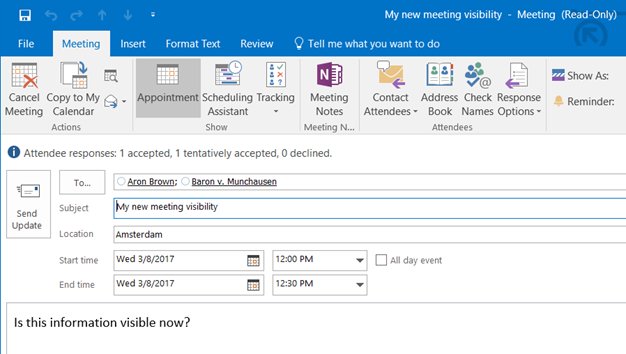
When scheduling a meeting with Kim Akers I can now see her appointment details in Outlook, and I can open the appointment to see all details (read-only) of this appointment as shown in the following two screenshots:

image

image

Note. Check the Set-MailboxFolderPermission article on Microsoft TechNet for all details regarding the permissions that can be assigned.

Continue reading Setting Calendar permissions right after mailbox creation

Improve autodiscover performance

Autodiscover can be a lengthy process, especially if you are in a hosted environment or if your mailbox is in Office 365.

The autodiscover process consists of five different steps, it depends on your environment where autodiscover stops and returns the information. Autodiscover is using the following mechanisms:

  • Service Connection Point (SCP) in Active Directory. This is used by domain clients.
  • Root domain discovery, used by non domain joined clients or clients not being able to access Active Directory. All other steps are used by these clients as well.
  • Autodiscover.contoso.com (standard autodiscover mechanism)
  • Autodiscover redirect to autodiscover site (often used by hosting companies)
  • Autodiscover SRV records in DNS (sometimes used by hosting companies)
  • Autodiscover redirect to Office 365 (outlook.com)

If your mailbox is in Office 365, outlook will go through all these steps until it finds the information in Office 365. All steps will fail with the accompanying time-out and this will take quite some time. This can be seen in the Outlook Test Email AutoConfiguration option:

image

Continue reading Improve autodiscover performance

Cisco Email Security Appliance and DKIM Signing

In a previous blogpost, I already discussed DKIM signing with Exchange 2016:  SenderID, SPF, DKIM and DMARC in Exchange 2016 – Part II

Exchange out-of-the-box does support SPF checking, but DKIM signing/verifying and DMARC verifying are not supported. There are free 3rd party tools for DKIM Signing that can be found on GitHub, but at the moment of writing this tool only supports DKIM Signing, but does not support DKIM verifying. I have to admit that DKIM signing with this tool works very well.

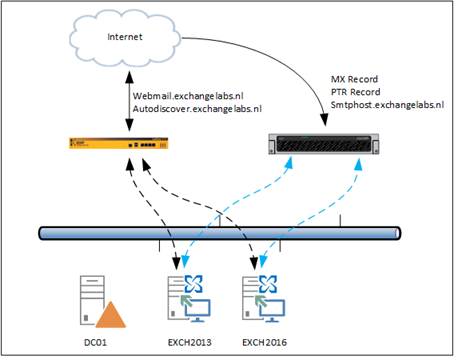
I already explained earlier that I’ve installed and configured a Cisco Email Security Appliance (ESA, previously known as IronPort) appliance in my lab environment, and this is installed like this:

image

Figure 1. My testlab Exchange environment.

All outbound SMTP mail is via the ESA. The FQDN of the ESA is smtphost.exchangelabs.nl, of course it has a public IP address with a corresponding PTR record.

Continue reading Cisco Email Security Appliance and DKIM Signing

Cisco IronPort and Exchange 2016

If you have been following my blogs over the years you should be aware that I’ve always been using Exchange Edge Transport servers in front of my Mailbox servers for message hygiene purposes. My last (well known) environment looked like this:

image

There are two Mailbox servers (Exchange 2013 and Exchange 2016) and two Edge Transport servers (also Exchange 2013 and Exchange 2016). MX records point to both Edge Transport servers and there are two Edge Synchronizations. And the Edge Transport servers were capable for DKIM signing (as posted in a previous blogpost), but lacked DKIM verification and DMARC validation.

The most important part in the Edge Transport server is the Real Time Blocklist, configured to use Spamhaus for connection filtering. While this works pretty well (there still is quite some spam that gets delivered into mailboxes) there is always room for improvement. I have been looking at cloud solution, but they didn’t always deliver what was expected.

A couple of my customers are using Cisco Email Security Appliance (previously known as IronPort) solutions on-premises and are happy with it, so time to start testing a Cisco Email Security Appliance (ESA) in my own environment. Continue reading Cisco IronPort and Exchange 2016