Category Archives: Exchange

Export Email Addresses in Exchange 2013

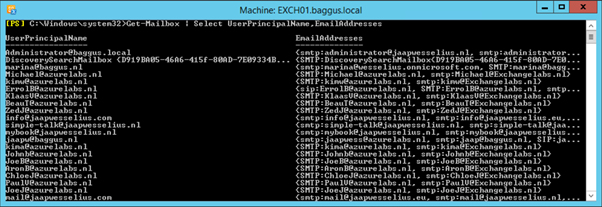
For a project I had to create a CSV file with all Mailboxes, their UPN and their Email addresses. Not a big deal since you can use the following command:

Get-Mailbox | Select UserPrincipalName,EmailAddresses
image

Exporting to a CSV is a default feature in PowerShell using the Export-Csv command, like this:

Get-Mailbox | Select UserPrincipalName,EmailAddresses | Export-Csv C:\Temp\Addresses.csv

Continue reading Export Email Addresses in Exchange 2013

Exchange Server 2013 CU7

On Tuesday December 9, 2014 Microsoft released Exchange Server 2013 Cumulative Update 7 and the UM Language Packs for Cumulative Update 7, 105 days after the release of the previous CU6 update. This release is a little overdue because of a last minute issue that was found moments before the original release date of CU7. As long as it improves the quality of the release this shouldn’t be a problem though.

CU7 contains fixes for issues reported by customers, including the Russian Time Zone issue and fixes for issues identified in MS14-075. Updates for MS14-075 are also available for Exchange Server 2013 Service Pack 1 and Exchange Server 2013 Cumulative Update 6. Because of the Microsoft (N-1) support policy this hotfix won’t be available for CU5.

Continue reading Exchange Server 2013 CU7

Health Manager does not start on Exchange 2013 Edge Transport Server

After installing an Exchange 2013 Edge Transport Server (CU6) I noticed the Microsoft Exchange Health Manager was not running. When trying to start this service the following error occurred:

Windows could not start the Microsoft Exchange Health Manager service on Local Computer.

Error 1075: The dependency service does not exist or has been marked for deletion.

image

Continue reading Health Manager does not start on Exchange 2013 Edge Transport Server

Move mailboxes using MigrationWiz

If you don’t want to use the standard Microsoft tools for migrating Mailboxes to or from Exchange Online you have to use a 3rd party solution. One online solution is MigrationWiz from BitTitan. There are a number of advantages of using MigrationWiz over the standard Microsoft tools, especially when using a Cutover Exchange Migration (CEM) or a Staged Exchange Migration (SEM). A Cutover Exchange Migration is basically a big bang scenario where you switch all services at the same time and gradually migrate all the Mailbox content. There’s no way to schedule anything here and this is much better when using MigrationWiz.

MigrationWiz is using Exchange Web Services to login to your on-premises Mailbox and to your online Mailbox to move all the content between the two platforms.

Continue reading Move mailboxes using MigrationWiz

Configure disks using PowerShell in Windows 2012 R2

When installing and configuring a large Exchange environment you most likely will have a lot of disks attached to the Exchange servers. Manual configuration of the disks is no fun so PowerShell is your friend here.

These are the steps that need to be done:

  • Create directory structure for the Mount Points (New-Item).
  • Set the disks online and initialize them (Initialize-Disk).
  • Create the partitions (New-Partition).
  • Link them into the Mount Point structure (Add-PartitionAccessPath)
  • Format them (Format-Volume).

Continue reading Configure disks using PowerShell in Windows 2012 R2