Category Archives: Office365

Azure AD Connect Unable to update this object

In earlier blog post I explained how to create user account on-premises and accompanying Mailboxes in Office 365. This is possible with or without an Exchange server on-premises. The latter works, but it’s not supported.

There are also scenarios where you have cloud identities in Office 365 that you want to connect to user accounts in an on-premises Active Directory, so basically converting the cloud identity to a synced identity. This is a common scenario for example when moving from one tenant in Office 365 to another tenant, of maybe when moving from Groupwise or Notes to Office 365.

Suppose we have a cloud identity in Office 365 for a user named Chong Kim, he has an E3 license, a username ckim@exchangelabs.nl and this is also his primary SMTP address.
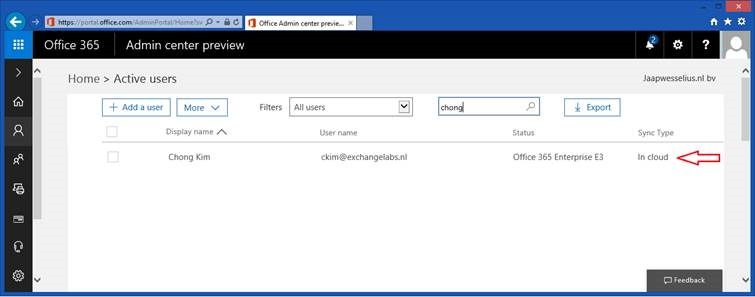
clip_image002 Continue reading Azure AD Connect Unable to update this object

Deletion threshold in Office 365 or Azure AD Connect

image

Recently I had one of these head scratching moments…. We were connecting an on-premises Active Directory (approx. 80,000 objects) to Office 365 using Azure AD Connect. We had a list of OU’s that was supposed to be synchronized with Office 365 and after running the Azure AD Connect wizard all objects in the corresponding OU’s were synchronized to Office 365.

The next day we got feedback from the organization the wrong OU’s were synchronized and that we had to select different OU’s (we configured the OU’s correctly, but the list we got was not correct).

When you deselect an OU in the Synchronization Service Manager (miisclient.exe in the C:\Program Files\Microsoft Azure AD Sync\UIShell directory as shown in the following screenshot) you would expect that all objects in this OU are no longer synchronized and would disappear in Office 365.

clip_image002

Continue reading Deletion threshold in Office 365 or Azure AD Connect

Permanently delete users from Office 365

When you delete user accounts from Office 365 (en thus Azure Active Directory) these accounts are not permanently deleted, but they are kept in a Deleted Users container for 30 days. This is not only true for cloud users that are deleted in the Microsoft Online Portal, but also for synced users that are deleted in your on-premises Active Directory.

clip_image002

Although you can see the deleted users in the Microsoft Online Portal, there’s no way to permanently delete them here.

The solution is to use the Azure Active Directory Module for PowerShell, using PowerShell you can actually permanently delete these user account.

To retrieve a list of all users in the Deleted Users container open Azure Active Directory PowerShell and execute the following command:

Connect-MSOLService
Get-MsolUser -ReturnDeletedUsers

clip_image004

To permanently remove these user accounts you can use the same command, but pipe the output of the command into the Remove-MsolUser -RemoveFromReclycleBin command. You can add the -Force option to bypass the confirmation of each user deletion (i.e. the ‘Are you sure? Yes[y], No[n]’ message).

clip_image006

Now when you execute the Get-MsolUser -ReturnDeletedUsers command you’ll see the all users are permanently removed.

Please be careful, once permanently removed there’s no way to restore the user accounts!

Office 365 Directory Synchronization without Exchange server Part III

In my previous blog post I explained how to manage your Email attributes in Office 365 by directly editing the Exchange attributes in your on-premises Active Directory. This works fine, but it is not recommended nor is it supported by Microsoft.

In this blogpost I’ll discuss how to add an Exchange server on-premises (or keep the last Exchange server when you’ve moved all Mailboxes to Office 365 for that matter) and manage your Exchange Online environment properly.

Exchange Server on-premises

So, what options do you have? Add an Exchange server on-premises, or keep one of the existing (hybrid) Exchange servers for management purposes. Since this is a green field Active Directory, and there’s no Exchange server on-premises you can use the free Microsoft Hybrid License to for this management server. For additional details on this free Exchange license you can check the Microsoft knowledgebase article KB2939261: https://support.microsoft.com/en-us/kb/2939261.

Continue reading Office 365 Directory Synchronization without Exchange server Part III

Office 365 Directory Synchronization without Exchange server Part II

The question in my previous blog post was “Can we decommission our Exchange servers after moving to Office 365?” and the blunt answer was “No, you cannot decommission your last Exchange server on-premises”.

In this previous blog post I showed you what happens if you synchronize a user to Azure Active Directory from your on-premises Active Directory, and how to create a Mailbox in Exchange Online with a proper primary Email address. At the same time, it was only possible to set only one Email address, and there’s no possibility to add multiple Email addresses, nor is it possible to change any other Exchange related setting.

In this blog post I’ll discuss how to extend Active Directory with Exchange attributes to unleash more functionality and management options in Exchange Online. Please note that the solution in this blog works fine, but it is not recommended and not supported by Microsoft. Continue reading Office 365 Directory Synchronization without Exchange server Part II