Tag Archives: Exchange 2010

Load Balancing Exchange 2010 with F5 LTM

In a earlier blogpost on load balancing Exchange 2010 I explained how to achieve this with a Kemp Loadmaster. In this blogpost I’d like to demonstrate how to configure this with an F5 Local Traffic Manager (LTM). This is actually part I of what I’ve demo’ d in the MEC 2012.

The configuration looks like this. There are two multi-role servers configured with a Database Availability Group (DAG). There’s a File Share Witness (FSW) configured on server FS01. The F5 itself is installed in a two arm configuration, so the VIP for the clients is on a different subnet then the Exchange Server.

image

Continue reading Load Balancing Exchange 2010 with F5 LTM

Exchange 2010 SP3 on Windows Server 2012

Now that Exchange 2010 SP3 is available it’s also possible to install it on Windows Server 2012. Normally that’s not a problem, but you have to be careful with the prerequisite software. Windows Server 2012 comes with .NET Framework 4.5 and Management Framework 3.0 (including Powershell 3.0) but Exchange 2010 still requires .NET Framework 3.5 and Powershell 2.0. Luckily Powershell 2.0 and Powershell 3.0 can coexist on the same box with any issues.

Install .NET Framework 3.5 and Powershell 2.0

To install .NET Framework 3.5 (which automatically includes Powershell 2.0 on Windows Server 2012) you can use Server Manager, but there’s a little snag because Server Manager does not know where the install files are located 🙂 Continue reading Exchange 2010 SP3 on Windows Server 2012

Load balancing Exchange 2010 (part II)

In my previous post I discussed Exchange 2010 load balancing principles briefly (I need to leave some additional stuff for my MEC presentation) and how to setup a Kemp LoadMaster in a single-arm configuration. In this 2nd (and final) blog post I’ll show you how to configure Virtual Services for OWA 2010 and MAPI (Outlook clients).

Create a new Virtual Service for OWA

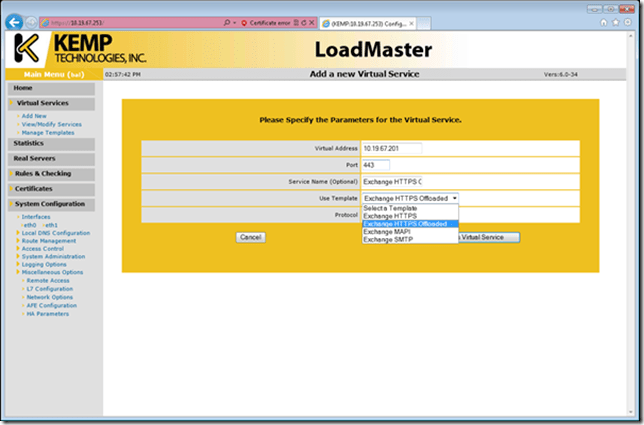
To create a new Virtual Service expand the Virtual Services and click Add New to open the wizard and fill in the necessary options like the IP Address of the new virtual service, the accompanying port number and give the service a nickname. In the Use Template option you can select a predefined template for the service. The advantage of using a template is of course that all options are filled in by Kemp, optimized specifically for the LoadMaster. Since we’re creating an OWA service select the Exchange HTTPS Offloaded template and click the Add this Virtual Service button.

In this example the Client Access Servers are configured with SSL offloading. The clients connect to the LoadMaster using SSL, the LoadMaster in turn connects just on port 80. For more information on how to configure SSL offloading in Exchange Server 2010 please check this blog post: http://www.jaapwesselius.com/2012/06/10/ssl-offloading-with-powershell/
image

Figure 1. Select a preconfigured template to use when creating a new Virtual Service.

Continue reading Load balancing Exchange 2010 (part II)

Load balancing Exchange 2010 (Part I)

During TechEd 2010 in Berlin Ross Smith IV from Microsoft suddenly announced that Microsoft recommends using a hardware load balancer for Exchange Server 2010 instead of using Windows Network Load Balancing. You can check the presentation online on Channel9: http://channel9.msdn.com/Events/TechEd/Europe/2010/UNC311.

NLB has some known issues when it comes to Exchange Server 2010 like scalability issues, lack of service awareness, a full reconnect of all clients when adding or removing a new NLB member and only the option of Source IP for persistence.

Continue reading Load balancing Exchange 2010 (Part I)

Insufficient Access Rights

During an Exchange 2003 to Exchange 2010 migration I ran into an issue where the mailbox could not be moved to Exchange 2010 because of an “Insufficient Access Rights” error:

[PS] C:\Windows\system32>get-mailbox -Identity “Joe Sixpack” | New-MoveRequest -TargetDatabase dB01 -BadItemLimit:25 -AcceptLargeDataLoss:$true

Continue reading Insufficient Access Rights