Tag Archives: Exchange 2013

Upgrade to Exchange 2010 SP3 fails with CSCRIPT error

Recently I was upgrading my Exchange 2010 SP2 combined CASHUB servers (four servers in a load balanced array) to SP3. Two servers went fine, but two servers failed with a CSCRIPT error:

Setup cannot continue with the upgrade because the ‘cscript’ () process (ID: 5652) has open files. Close the process and restart Setup.

image

When looking with task manager several script processes were indeed running. It turned out to be the System Center Management client that was performing all kinds of activities.

Stop the System Center Management agent (via the Services MMC Snap-in) and the upgrade runs fine.

Lync 2013 and Exchange 2013 Unified Messaging

In earlier blog posts I’ve written how to install Exchange 2013 and in another series of blog posts I’ve written how to install Lync Server 2013, including connectivity with a SIP trunk provider using a Lync 2013 mediation server.

The last and most exciting part (and least used I’m afraid) is to connect the two platforms into the Exchange 2013 Unified Messaging server role. If a call cannot be answered it’s rerouted into the Exchange server’s UM role where a voicemail can be recorded. This voicemail is then delivered into the user’s mailbox.

Continue reading Lync 2013 and Exchange 2013 Unified Messaging

Installing Exchange 2013 – Part I

Exchange server 2013 consists of two server roles, the Mailbox Server (sometimes referred to as the back-end) and the Client Access Server (sometimes referred to as the front-end). All clients connect to the CAS Server and the CAS Server proxies the request to the appropriate mailbox server.

It is possible to install the server roles on dedicated servers, multiple Exchange 2013 CAS servers with a hardware load balancer and multiple Exchange 2013 Mailbox servers with a Database Availability Group. This is the preferred way for large companies with lots of mailboxes, lots of servers and maybe multiple (global) datacenter. To be honest, this is where Exchange 2013 is designed for. But it is also possible for smaller organizations to install just two Exchange 2013 server with both roles on it, a DAG for mailbox resiliency and a hardware of software load balancers for the protocol resiliency.

Continue reading Installing Exchange 2013 – Part I

How to brand OWA in Exchange 2013

This page is updated with information on Exchange 2016 and Exchange 2019.

A long time ago, Jeff Guillet wrote an excellent post on his EXPTA {blog} on how to brand the OWA logon page in Exchange 2007 and Exchange 2010, which is perfect when testing load balancing solutions. You can find this post here: http://www.expta.com/2010/03/how-to-brand-owa-2007-and-2010-with.html.

For testing OWA in Exchange 2013 and higher, the process is somewhat similar. On the Exchange 2013 Client Access server or Exchange 2016/2019 Mailbox Server, navigate to the C:\Program Files\Microsoft\Exchange Server\V15\FrontEnd\HttpProxy\owa\auth directory and open the logon.aspx page with (for example) Notepad. If you are running Exchange 2019 on Windows Server Core you can use the following command:

Notepad “C:\Program Files\Microsoft\Exchange Server\V15\FrontEnd\HttpProxy\owa\auth\logon.aspx”

In this file, scroll down to the div class=”logonContainer” section and add the servername text just before the UserNameLabel variable, as shown in the following screenshot (click to enlarge)
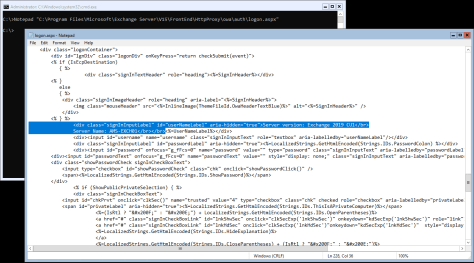
OWA Logon.aspx

Save the file and in your browser navigate to the Exchange Server to see the results:

owa branding

Warning. When upgrading to a new CU, the logon.aspx is overwritten and you have to make these changes again.

And another warning…. I’m not so sure if this is fully supported by Microsoft 😊

Last Updated on February 27, 2019

Exchange 2013 Front-End Back-End

One of the major changes in 2013 is the new architecture. Exchange 2013 only has two server roles:

  • Client Access Server role;
  • Mailbox Server role;

The other server roles that were available in Exchange 2007 and Exchange 2010 still exist, but are now known as Services. The Client Access Server (CAS15) consists of the Client Access Front-End (café) and the Front-End Transport (FET). The Mailbox Server role consists of the Mailbox Service, Unified Messaging Service, Client Access service (ambiguous naming I’m afraid) and the Hub Transport Services. The only exception is the Edge Transport Server role. When Exchange 2013 goes to RTM there won’t be an Edge Transport Server, this will be released with SP1 of Exchange 2013.

Continue reading Exchange 2013 Front-End Back-End