Tag Archives: PowerShell

Command Logging in Exchange 2013 SP1

Re-introduced in Exchange 2013 SP1 is Command Logging. This was available in Exchange Server 2010 when using the Exchange Management Console. This way you could easily see what commands the Management Console was actually executing.

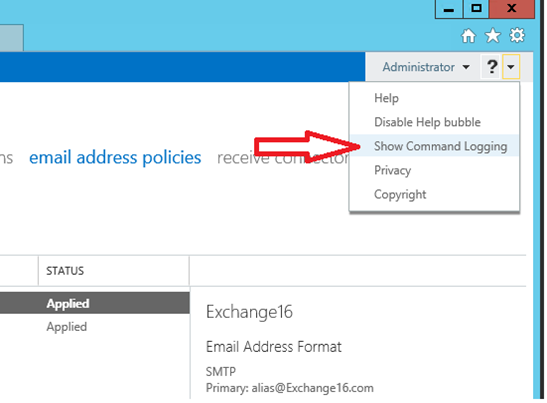
Command logging is now also available in Exchange Server 2013 SP1, but you have to be aware that you need to turn it on before you start working in the Exchange Admin Center. In EAC click on the little arrow in the top right corner and select the Show Command Logging option.
image

A new window appears where all commands are shown based on what you configure in EAC. It can be a bit cryptic, sometimes object GUIDs are used instead of normal (readable) names but at least it’s possible to figure out what’s happening under the hood.

image

In the screenshot shown here I’ve created a new Email Address Policy and I can use Command Logging to figure out what EMS commands were used. The only thing I have to figure out now what container is used for the User objects, but that’s not too difficult.

ISE, Remote PowerShell and Exchange 2013

Last TechEd in Madrid I got an interesting question about Exchange 2013 supportability in the PowerShell ISE (Integrated Scripting Environment). This gentleman was using the Remote PowerShell functionality in ISE and was wondering if this was a supported solution.

It took some time to get a confirmation, but these are the supported scenarios:

  • Exchange Management Shell (which is running Remote PowerShell) – supported
  • Regular PowerShell connecting to Exchange via Remote PowerShell – supported
  • Powershell ISE connecting to Exchange via Remote PowerShell – supported

Regular PowerShell or PowerShell ISE simply loading Exchange snapins is not supported unless Technet specifically calls out that you must run local PowerShell for a specific cmdlet.

Remote PowerShell can be activated like this:

$Session = New-PSSession –ConfigurationName Microsoft.Exchange –ConnectionUri http://ams-exch01.contoso.com/PowerShell -Authentication Kerberos
Import-PSSession $Session

This can be done in a normal PowerShell window or in the ISE:

image

A Microsoft knowledgebase article was released recently regarding an issue with Remote Powershell, ISE and Exchange Server 2010 SP3:

http://support.microsoft.com/kb/2859999 – Some cmdlets fail in PowerShell ISE after an upgrade to Exchange Server 2010 SP3

Exchange 2010 SP3 on Windows Server 2012

Now that Exchange 2010 SP3 is available it’s also possible to install it on Windows Server 2012. Normally that’s not a problem, but you have to be careful with the prerequisite software. Windows Server 2012 comes with .NET Framework 4.5 and Management Framework 3.0 (including Powershell 3.0) but Exchange 2010 still requires .NET Framework 3.5 and Powershell 2.0. Luckily Powershell 2.0 and Powershell 3.0 can coexist on the same box with any issues.

Install .NET Framework 3.5 and Powershell 2.0

To install .NET Framework 3.5 (which automatically includes Powershell 2.0 on Windows Server 2012) you can use Server Manager, but there’s a little snag because Server Manager does not know where the install files are located 🙂 Continue reading Exchange 2010 SP3 on Windows Server 2012

SSL offloading with Powershell

When you’re using a (hardware) load balancer in combination with Exchange Server 2010 you might want to offload SSL from the Exchange servers to the load balancers. This way you get more options available for persistence in the load balancer.

Enabling SSL offloading in Exchange 2010 is not that difficult but it consists of several steps which can be prone to error if you have to configure this on multiple servers (which is most likely the case of course with a load balancer).

Continue reading SSL offloading with Powershell

Building Hosted Exchange – Part II

In my previous blog post I tried to explain why Microsoft is following the partner model for hosted environment. If you fully understand the Microsoft guidance document and really want to build it yourself instead of using a 3rd party Control Panel vendor (which I always recommend) I’ll try to outline the various steps that need to be done.

Please note that this blog post is published ‘as is’ and is my personal belief on how stuff can be done. You still have to test everything in a lab environment before building things in production. I cannot, will not nor take any responsibility about your environment when things go wrong!

Continue reading Building Hosted Exchange – Part II