Category Archives: Exchange

AutodiscoverRedirect in Exchange 2013 SP1 on Windows 2012 R2

In earlier versions of Exchange you can use the Autodiscoverredirect option to retrieve autodiscover information if your primary SMTP domain in your email address does not match the domain name of the autodiscover DNS record in your Exchange deployment. You’ll face this issue when your Client Access server is using webmail.contoso.com and autodiscover.contoso.com but your email address is john@fabrikam.com. In this case your Outlook client will automatically start looking for a DNS record called autodiscover.fabrikam.com which points to the autodiscover.contoso.com. As a result a certificate warning is presented since the name of the request does not match the name on the certificate.

Continue reading AutodiscoverRedirect in Exchange 2013 SP1 on Windows 2012 R2
Move Transport Database in Exchange 2013

When designing an Exchange 2013 environment I always recommend using an additional disk to store the Transport Database and accompanying transaction log files to a separate disk. When things with SMTP get out-of-control and the Queue database grows too much your boot- and system disk do not fill up.

The Exchange Transport Configuration is stored in a CONFIG file called EdgeTransport.exe.config which is stored in the C:\Program Files\Microsoft\Exchange Server\V15\Bin directory.

Continue reading Move Transport Database in Exchange 2013

load balancing in Exchange 2013 SP1 with F5

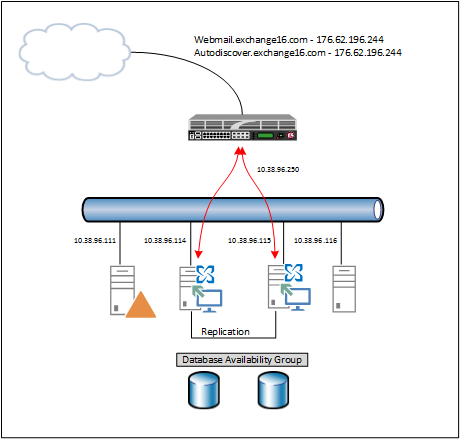
In my previous blog I wrote about the new SSL offloading capabilities in Exchange 2013 SP1. In this blog I will explain how to use this with a load balancer. In my lab environment I’m using an F5 (virtual) LTM running on Hyper-V. My lab is configured as shown in the following figure:

image

Continue reading load balancing in Exchange 2013 SP1 with F5

Exchange 2013 SP1 SSL Offloading

One of the ‘new’ features in Exchange 2013 SP1 is SSL Offloading, although I can better say ‘re-introduced’ features since this was available in Exchange 2010 but not supported in Exchange 2013 RTM.

I’ve explained numerous time why you want to use SSL offloading in Exchange, but mainly because of performance reasons (load balancers typically have a dedicated chip for SSL decryption) and for SSL certificate management. Suppose you have 8 Client Access servers and *not* using SSL Offloading. In this case you have to manage the SSL certificate on each individual Client Access server. If you have an SSL offloading scenario you have only one SSL certificate to manage, and that’s the SSL certificate on the load balancer.

Continue reading Exchange 2013 SP1 SSL Offloading

MapiHttp in Exchange 2013 SP1

Microsoft introduced a new protocol in Exchange Server 2013 SP1 called MapiHttp (codename Alchemy). This is an Office 365 development to replace the traditional RPC/HTTPS protocol used in Outlook Anywhere.

Outlook Anywhere was developed in the Exchange 2003 timeframe to use Outlook 2003 over the Internet. Outlook is using RPC to communicate with the Exchange server, and the RPC traffic is encapsulated in HTTPS packets. To achieve this an RPC proxy is used. The ‘problem’ here is that this is not too stable, especially not when you have a flaky Internet connection. RPC is never designed to work with network connections like this. Besides this, the RPC proxy is a Windows components and thus a responsibility of the Windows team at Microsoft and not the Exchange team. So if problems arise, the Windows team has to solve this and the only thing the Exchange team can do is wait. Not a desirable solution.

Continue reading MapiHttp in Exchange 2013 SP1