Category Archives: Exchange

Command Logging in Exchange 2013 SP1

Re-introduced in Exchange 2013 SP1 is Command Logging. This was available in Exchange Server 2010 when using the Exchange Management Console. This way you could easily see what commands the Management Console was actually executing.

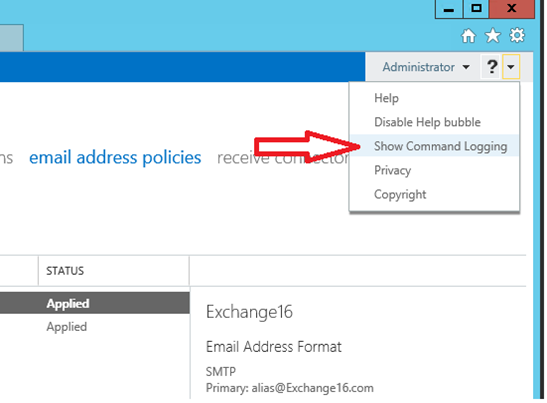
Command logging is now also available in Exchange Server 2013 SP1, but you have to be aware that you need to turn it on before you start working in the Exchange Admin Center. In EAC click on the little arrow in the top right corner and select the Show Command Logging option.
image

A new window appears where all commands are shown based on what you configure in EAC. It can be a bit cryptic, sometimes object GUIDs are used instead of normal (readable) names but at least it’s possible to figure out what’s happening under the hood.

image

In the screenshot shown here I’ve created a new Email Address Policy and I can use Command Logging to figure out what EMS commands were used. The only thing I have to figure out now what container is used for the User objects, but that’s not too difficult.
Exchange 2013 Service Pack 1

On February 25, 2014 Microsoft released Exchange 2013 SP1, an interesting upgrade in the Exchange 2013 program. Besides SP1 new UM Language Packs have been released as well. For more detailed information please check the SP1 release notes. At the same time Microsoft has released Update Rollup 5 for Exchange 2010 SP3 and Update Rollup 13 for Exchange 2007 SP3.

Looking at the Cumulative Updates with Exchange 2013, SP1 is identical to CU4. One reason for releasing a Service Packs is the support lifecycle. Major releases and Service Packs of a Microsoft product are included in the support lifecycle, Cumulative Updates are not.

Continue reading Exchange 2013 Service Pack 1

Strange directories in Exchange 2013 on D-drive

I’ve been installing Exchange 2013 in my lab environment recently. For Exchange I use a System- and Bootdisk and a Mailbox database disk in my lab. Sometimes I add a small disk to the server where the SMTP transport files are located, but this is always added after Exchange is installed.

Recentely I created a template where the C:\ (System- and Boot), D:\ (SMTP files) and F:\ (mailbox database) are already present BEFORE Exchange 2013 is installed.

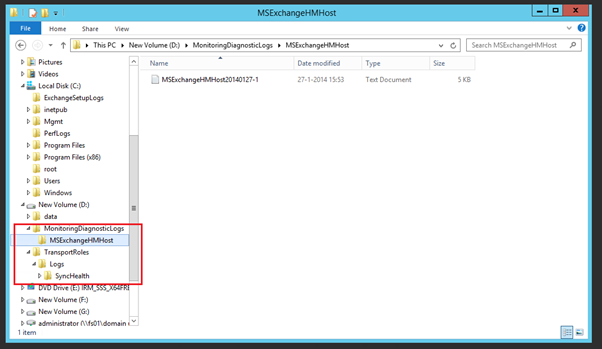
Now what happens is that two additional directories are created on this D:\ drive during installation of Exchange 2013:

  • D:\MonitoringDiagnosticLogs\MSExchangeHMHost
  • D:\TransportRoles\Logs\SyncHealth. A small file is located in here called MSExchangeHMHost20140127-1 (that last part is the data the file is created)

image

It turns out that this is hardcoded in the setup application of Exchange 2013. I’ve received one email from somebody who saw this in Exchange 2010 CU3 as well, so most likely it happened earlier as well.

Since it is hardcoded, it happens only on drive D:\. If drive D:\ is your DVD player and the additional disk is E:\ the directories are not created.

This bug is filed at the Exchange team, now we have to wait what happens.

Balance Mailbox databases in a DAG

If you have a DAG with multiple Mailbox servers and a lot of Mailbox databases it’s a good practice to regularly have a look at the distribution of the Mailbox database.

When you reboot a Mailbox server for example all active copies of Mailbox databases are moved to other Mailbox server but they are never moved back to their original location.

Continue reading Balance Mailbox databases in a DAG