Tag Archives: Office 365

SenderID, SPF, DKIM and DMARC in Exchange 2016 – Part II

In the previous blogpost I have been discussing how SPF works and how it uses public DNS to validate the authenticity of the sending SMTP servers. When SPF is implemented correctly a receiving mail server can validate is the sending mail server is allowed to send email on behalf of the sender or his organization.

In this blogpost I will discuss DKIM signing as an additional (and more complicated, and more difficult to spoof) step in email validation.

As a quick reminder, here’s how my lab environment looks like:

image

There’s an Exchange 2016 CU2 Mailbox server hosting several Mailboxes, and there’s an Exchange 2016 CU2 Edge Transport server. An Edge synchronization will make sure that all inbound and outbound SMTP traffic is handled by the Edge Transport server.

In my previous blogpost an SPF record was created and implemented with the following value:

v=spf1 a:smtphost.exchangelabs.nl ~all

so receiving mail servers can validate that my Edge Transport server is allowed to send email on my behalf, and when mail is originating from another mail server it might well be a spoofed message.

But for now let’s continue with DKIM. Continue reading SenderID, SPF, DKIM and DMARC in Exchange 2016 – Part II

SenderID, SPF, DKIM and DMARC in Exchange 2016 – Part I

SenderID has been used in Exchange as a means for anti-spam for quite some time, as far as I can remember this was first used in Exchange 2010. Related to SenderID is SPF (Sender Policy Framework). SPF looks like SenderID functionality, but it differs in the way how it checks email messages.

Both use public DNS records with TXT records where information is stored regarding the sending SMTP server, and this information is used by the receiving (Exchange) server to validate if the sending server is allowed to send email on behalf of the sender.

Getting more popular for fighting spam are DKIM (DomainKeys Identified Mail) and DMARC (Domain-based Message Authentication, Reporting & Conformance). Just like SenderID and SPF, these solutions use public DNS for additional information as well, but since encryption is used most Exchange admin have some doubts about the complexity of DKIM and DMARC.

In the upcoming blogpost I’ll discuss SPF, DKIM and DMARC as implemented in my lab environment which looks like this:

image

There’s an Exchange 2016 CU2 Mailbox server hosting several Mailboxes. The server is accessible via webmail.exchangelabs.nl and autodiscover.exchangelabs.nl (same IP address, behind a Kemp LM3600 load balancer) and configured with a Digicert UC certificate.

In addition to this there’s an Exchange 2016 CU2 Edge Transport server with FQDN smtphost.exchangelabs.nl. Besides the regular A and MX record, the IP address is also configured in Reverse DNS. The Edge Transport server is also behind a Kemp LM3600 load balancer, and it has a Digicert SSL Certificate with the same domain name. There’s an Edge Synchronization configured between the Mailbox server and the Edge Transport server, and all inbound and outbound mail is handled by the Edge Transport server. Continue reading SenderID, SPF, DKIM and DMARC in Exchange 2016 – Part I

Azure AD Connect Unable to update this object

In earlier blog post I explained how to create user account on-premises and accompanying Mailboxes in Office 365. This is possible with or without an Exchange server on-premises. The latter works, but it’s not supported.

There are also scenarios where you have cloud identities in Office 365 that you want to connect to user accounts in an on-premises Active Directory, so basically converting the cloud identity to a synced identity. This is a common scenario for example when moving from one tenant in Office 365 to another tenant, of maybe when moving from Groupwise or Notes to Office 365.

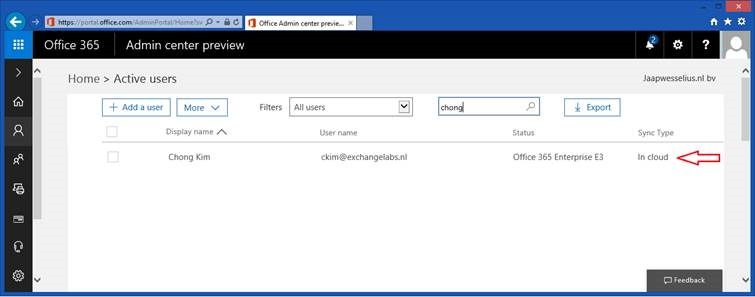
Suppose we have a cloud identity in Office 365 for a user named Chong Kim, he has an E3 license, a username ckim@exchangelabs.nl and this is also his primary SMTP address.

clip_image002 Continue reading Azure AD Connect Unable to update this object

Office 365 Directory Synchronization without Exchange server Part II

The question in my previous blog post was “Can we decommission our Exchange servers after moving to Office 365?” and the blunt answer was “No, you cannot decommission your last Exchange server on-premises”.

In this previous blog post I showed you what happens if you synchronize a user to Azure Active Directory from your on-premises Active Directory, and how to create a Mailbox in Exchange Online with a proper primary Email address. At the same time, it was only possible to set only one Email address, and there’s no possibility to add multiple Email addresses, nor is it possible to change any other Exchange related setting.

In this blog post I’ll discuss how to extend Active Directory with Exchange attributes to unleash more functionality and management options in Exchange Online. Please note that the solution in this blog works fine, but it is not recommended and not supported by Microsoft. Continue reading Office 365 Directory Synchronization without Exchange server Part II

Change SMTP mail flow in hybrid scenario

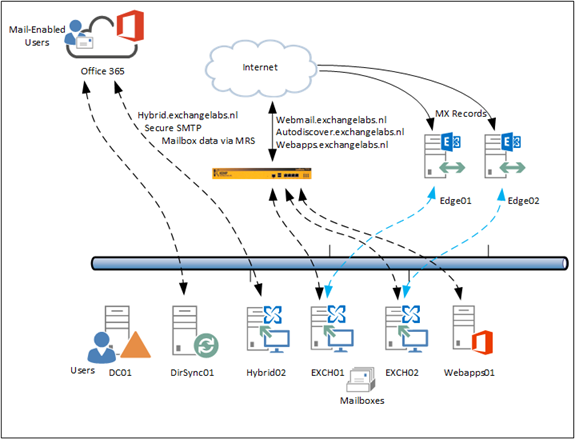
After building a hybrid Exchange environment as outlined in a couple of previous blog posts we have an Exchange 2013/2016 environment where some Mailboxes exist on-premises and some Mailboxes exist in Exchange Online. Autodiscover is still pointing to the on-premises environment, and so are the MX records. Inbound SMTP mail flow from the Internet is still accessing the on-premises Exchange 2016 Edge Transport servers before being delivered to the intended recipients.

image

Figure 1. The Exchange hybrid environment with Mailboxes on-premises and in Exchange online.

Continue reading Change SMTP mail flow in hybrid scenario