In my previous blogpost, I’ve discussed the prerequisites for moving from Exchange 2010 to Office 365 when using Directory Synchronization (using Azure AD Connect). In this blogpost I’ll discuss how to create an Exchange 2010 hybrid environment.
Exchange 2010 Hybrid
Now that Directory Synchronization is in place using Azure AD Connect we can focus on connecting the on-premises Exchange environment to Exchange Online, this a called an Exchange Hybrid Configuration.
Hybrid configurations can consist of Exchange 2010, Exchange 2013 or Exchange 2016 or a combination of versions, so it is possible to have an Exchange 2010 and Exchange 2013 coexistence scenario on-premises, and connect this to Exchange Online. However, when using multiple versions of Exchange in a Hybrid configuration there’s always add complexity, and when configured incorrectly you can get unexpected results. Therefore, I typically recommend using only one version, so if you’re running Exchange 2010 on-premises, there’s no need to add an Exchange 2013 or Exchange 2016 server to your configuration, just as a ‘hybrid server’. Despite what other people tell you, there’s no need to add a newer version, and Exchange 2010 Hybrid is fully supported by Microsoft. Better is to create an Exchange 2010 hybrid environment, and when the mailboxes (or most the mailboxes) are moved to Office 365 upgrade your existing Exchange 2010 environment to Exchange 2016. But that might be an interesting topic for a future blog post  .
.
Basically, we will create the following configuration (again, there is no Exchange 2016 server installed in the existing organization):
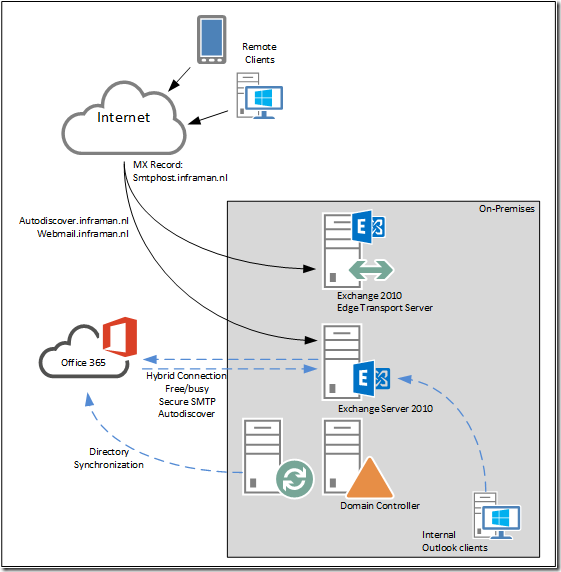
Figure 14. Exchange 2010 hybrid configuration.
Continue reading Moving from Exchange 2010 to Office 365 Part II →


 Jaap Wesselius
You must be logged in to post a comment.