Tag Archives: Exchange Online

Change SMTP mail flow in hybrid scenario

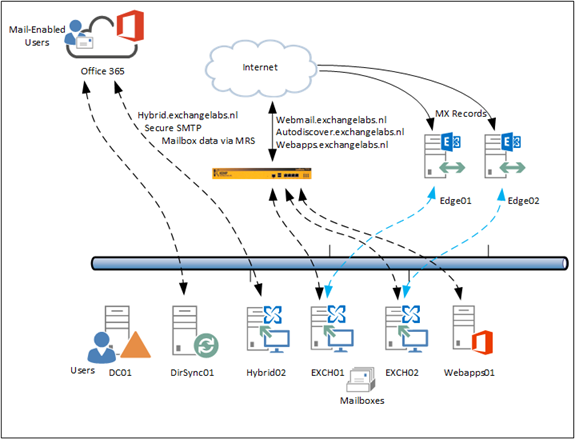
After building a hybrid Exchange environment as outlined in a couple of previous blog posts we have an Exchange 2013/2016 environment where some Mailboxes exist on-premises and some Mailboxes exist in Exchange Online. Autodiscover is still pointing to the on-premises environment, and so are the MX records. Inbound SMTP mail flow from the Internet is still accessing the on-premises Exchange 2016 Edge Transport servers before being delivered to the intended recipients.
image

Figure 1. The Exchange hybrid environment with Mailboxes on-premises and in Exchange online.

Continue reading Change SMTP mail flow in hybrid scenario

Exchange 2016 – What’s new?

Now that Microsoft has Exchange Server 2016 it’s time to have a closer look at what’s new in the product. It might not be a surprise that it looks a lot like Exchange Online. Not surprisingly since Microsoft is developing Exchange for the cloud, and Exchange on-premises is just a spin-off of Exchange Online, released on a quarterly basis.

It might be blunt to say, but Exchange 2016 is nothing more than Exchange 2013 Service Pack 2, if you look at the version numbering with PowerShell (Get-ExchangeServer | Select Name,AdminDisplayVersion) you’ll see that it’s actually a minor upgrade from 15.0 (Exchange 2013) to 15.1 (Exchange 2016).

The question can be raised why a new version? It’s all about the support lifecycle, and get rid of support for Exchange Server 2007. Customers need a new version, from a support point of view or from a license point of view (software assurance).

But, back to Exchange 2016… it is a new version, and with a new version also new features are introduced and other features are deprecated or removed.
Continue reading Exchange 2016 – What’s new?

The Secure Mail Certificate on server HYBRID01 is not bound to the SMTP Service

While configuring an Exchange 2013 organization in a hybrid scenario with Office 365 the Exchange Hybrid wizard stopped and showed the following error message:

Subtask CheckPrereqs execution failed: Configure Mail flow The Secure Mail Certificate on server HYBRID01 is not bound to the SMTP Service at Microsoft.Exchange.Management.Hybrid.MailFlowTask.CheckCertPrereqs()…

image

Continue reading The Secure Mail Certificate on server HYBRID01 is not bound to the SMTP Service

Manage Office 365 with PowerShell

The core components of Office 365 are Exchange Online, Lync Online and SharePoint Online, all are running on top of Windows Azure Active Directory as shown in the following figure:

image

All services can be managed from the Microsoft Online Portal. When logged on to the portal you can select the various services under Admin in the navigation pane. It is also possible to manage Office 365 using PowerShell, but all services require a different approach or module.

Managing Windows Azure Active Directory using PowerShell

To manage Windows Azure Active Directory with PowerShell you have to install the Azure Active Directory Module for Windows PowerShell (64-bit version) but before you can use this you also have to install the Microsoft Online Services Sign-In Assistant. Continue reading Manage Office 365 with PowerShell

Cloud identities, Linked Identities and Federated Identities

When you are using a cloud service, whether it be Office 365, Facebook, LinkedIn or Gmail you are using a user account, and these are also referred to as ‘identities’. Typically there are three types of identities in a cloud service: Cloud Identities, Synced Identities and Federated Identities.

  • Cloud Identity – a Cloud Identity is a user account that’s created and managed in the cloud service. In case of Office 365 this account is created and managed in the Microsoft Online Portal. Important to note is that when you access an Office 365 service, authentication takes place against the Windows Azure Active Directory Domain Controllers.
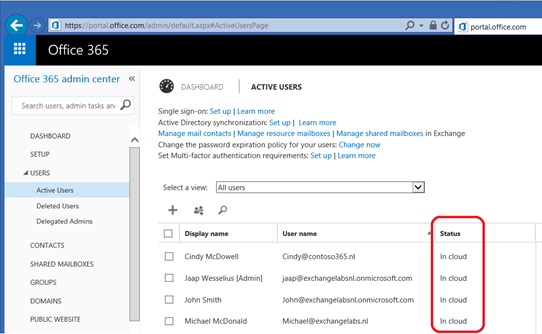
    In the Microsoft Online Portal these accounts are easily identifiable as Cloud Identities as can be seen in the following figure:
    image
  • Synced Identity – a Synced Identity is created and managed in your local Active Directory and synchronized with the Cloud service. In Office 365 you can opt to synchronize the passwords as well, although not the actual password is synchronized but a hash of the password. Like Cloud Identities authentication takes place against the Windows Azure Active Directory Domain Controllers. These accounts are identified in the Microsoft Online Portal as ‘Synced with Active Directory’ as shown in the following figure:
    image
    Although the username and password are identical in Office 365 and in the local Active Directory, this is not a Single Sign-On solution, but I always refer to this as a ‘Same Set of Credentials’ solution.
  • Federated Identity – a Federated Identity is a user account that’s created and managed in your local Active Directory and that’s synchronized with Office 365. When the account is synchronized an account in Office 365 (Windows Azure Active Directory) is created. When a service in Office 365 is accessed, the user is not authenticated against the Windows Azure Active Directory Domain Controllers, but the authentication request is redirected to your local Active Directory and Domain Controllers. To achieve this an Active Directory Federation Service (ADFS) needs to be in place. Since there’s only one set of credentials (all authentication takes place against your local Domain Controllers!) this is referred to as ‘Single Sign-On’.

Continue reading Cloud identities, Linked Identities and Federated Identities