Tag Archives: Exchange 2016

Upgrade Hybrid Server to Exchange 2016

I’m running a coexistence scenario with Exchange 2013 and Exchange 2016 without too many issues. My hybrid server is running on Exchange 2013 from the beginning, and it is time to upgrade this server to Exchange 2016.

If you have configured your Exchange environment correctly the hybrid server is nothing special. In my environment the hybrid server is just used for sending SMTP messages between Exchange Online and Exchange on-premises, and it is used for migrating Mailboxes back and forth.

Upgrading the existing Exchange 2013 hybrid server to Exchange 2016 is actually just a matter of installing a new Exchange 2016 Mailbox server, configure it correctly like the old Exchange 2013 hybrid server and rerun the Hybrid Configuration Wizard application.

image

Figure 1. The new hybrid server (hybrid02) will be installed next to the old hybrid server (hybrid01)

Continue reading Upgrade Hybrid Server to Exchange 2016

New Hybrid Configuration Wizard

With Exchange Server 2013 CU9 and Exchange Server 2016 Microsoft has released a new version of the Hybrid Configuration Wizard (HCW). Instead of running the HCW online, it is now a small stand-alone application which is installed on the hybrid server.

Installing and running the Hybrid Configuration Wizard is so easy, initially I didn’t want to write a blog post about it at all. But writing one doesn’t harm, so here we go…

The HCW is only a configuration tool, it configures both Exchange 2013/2016 on-premises as well as Exchange Online. It gathers information regarding the hybrid servers, where to deliver and receive SMTP messages and what certificates are used.

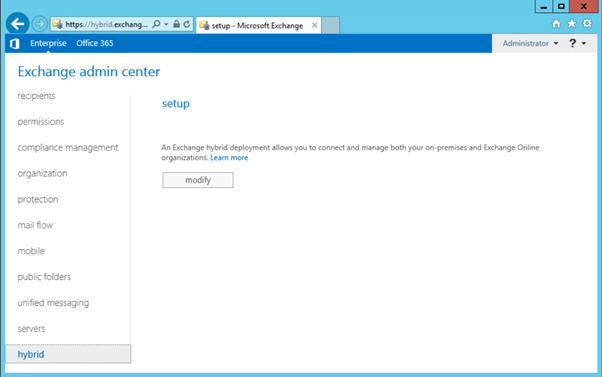
To install the new HCW and reconfigure the hybrid configuration, logon to the Exchange Control Panel and click Hybrid:

image

Continue reading New Hybrid Configuration Wizard

Deploy Exchange 2016

Exchange 2016 is the latest version of Exchange, and it’s not very different compared to Exchange 2013. When it comes to requirements, there are some differences though:

  • Domain Controllers need to be at Windows 2008 level;
  • Domain Functional Level (DFL) and Forest Functional level need to be at Windows 2008 level;
  • The Exchange servers themselves need to be running Windows 2012 or Windows 2012 R2. At the time of release Windows Server 10 is not supported.

There’s also something like Simplified Architecture. This is the Exchange 2013 Preferred Architecture, enforced on Exchange 2016. This means that there will be only one Exchange 2016 server role on the internal network, the Exchange 2016 Mailbox server. This is the same as the old Exchange 2013 multi-role server, but at this moment there’s no choice left. You have to install the Exchange 2016 Mailbox server, and you cannot opt to install a dedicated Client Access server anymore.

Continue reading Deploy Exchange 2016

Exchange 2016 – What’s new?

Now that Microsoft has Exchange Server 2016 it’s time to have a closer look at what’s new in the product. It might not be a surprise that it looks a lot like Exchange Online. Not surprisingly since Microsoft is developing Exchange for the cloud, and Exchange on-premises is just a spin-off of Exchange Online, released on a quarterly basis.

It might be blunt to say, but Exchange 2016 is nothing more than Exchange 2013 Service Pack 2, if you look at the version numbering with PowerShell (Get-ExchangeServer | Select Name,AdminDisplayVersion) you’ll see that it’s actually a minor upgrade from 15.0 (Exchange 2013) to 15.1 (Exchange 2016).

The question can be raised why a new version? It’s all about the support lifecycle, and get rid of support for Exchange Server 2007. Customers need a new version, from a support point of view or from a license point of view (software assurance).

But, back to Exchange 2016… it is a new version, and with a new version also new features are introduced and other features are deprecated or removed.
Continue reading Exchange 2016 – What’s new?

Exchange 2013 CU10

Microsoft silently released Exchange 2013 CU10 on September 15th 2015, right on track with their quarterly cadence, and as expected. There are no new features in this Cumulative Update, but besides a lot of hotfixes there’s also a change to RBAC which require changes to the Configuration Partition in Active Directory.

So, no changes to the Active Directory Schema, but you have to run Setup.exe /PrepareAD /IAcceptExchangeServerLicenseTerms before you start the actual setup. Please note that you have to do this, even if you run the GUI version of setup. If you omit this step the changes won’t be applied to Active Directory. As a result, the RBAC changes might not be available after your upgrade. A similar issue happened with CU9 as written down in this blog post MessageCopyForSentAsEnabled and MessageCopyForSendOnBehalfEnabled not available in CU9.

Before installing Exchange 2013 CU10 in your production environment I recommend testing it thoroughly in a lab environment. The last couple of CU’s have been pretty successful without too many issues, but there might be specific issues in your own organization that Microsoft is unaware of.

When upgrading DAG members please remember you disable all the Exchange server components as explained in my blog about deploying Exchange 2013 CU9.

You can download CU10 here, and the CU10 Language packs here. A complete list of issues resolved can be found in Knowledge Base Article KB3078678.

At the same time Microsoft released released Exchange Server 2010 Service Pack 3 Update Rollup 11 (KB3078674).

When Exchange 2016 is released in the (near) future, you will need Exchange 2013 CU10 or Exchange Server 2010 SP3 Update Rollup 11 for coexistence. This will be hardcoded in the product, so if you’re planning to deploy Exchange 2016 in the future you have to install these version.

Also, when you’re running an Exchange 2013 Hybrid scenario with Office 365 you have to use the latest version, so in this case Exchange 2013 CU10 is mandatory.