Category Archives: Exchange

Upgrade Hybrid Server to Exchange 2016

I’m running a coexistence scenario with Exchange 2013 and Exchange 2016 without too many issues. My hybrid server is running on Exchange 2013 from the beginning, and it is time to upgrade this server to Exchange 2016.

If you have configured your Exchange environment correctly the hybrid server is nothing special. In my environment the hybrid server is just used for sending SMTP messages between Exchange Online and Exchange on-premises, and it is used for migrating Mailboxes back and forth.

Upgrading the existing Exchange 2013 hybrid server to Exchange 2016 is actually just a matter of installing a new Exchange 2016 Mailbox server, configure it correctly like the old Exchange 2013 hybrid server and rerun the Hybrid Configuration Wizard application.

image

Figure 1. The new hybrid server (hybrid02) will be installed next to the old hybrid server (hybrid01)
Continue reading Upgrade Hybrid Server to Exchange 2016

New Hybrid Configuration Wizard

With Exchange Server 2013 CU9 and Exchange Server 2016 Microsoft has released a new version of the Hybrid Configuration Wizard (HCW). Instead of running the HCW online, it is now a small stand-alone application which is installed on the hybrid server.

Installing and running the Hybrid Configuration Wizard is so easy, initially I didn’t want to write a blog post about it at all. But writing one doesn’t harm, so here we go…

The HCW is only a configuration tool, it configures both Exchange 2013/2016 on-premises as well as Exchange Online. It gathers information regarding the hybrid servers, where to deliver and receive SMTP messages and what certificates are used.

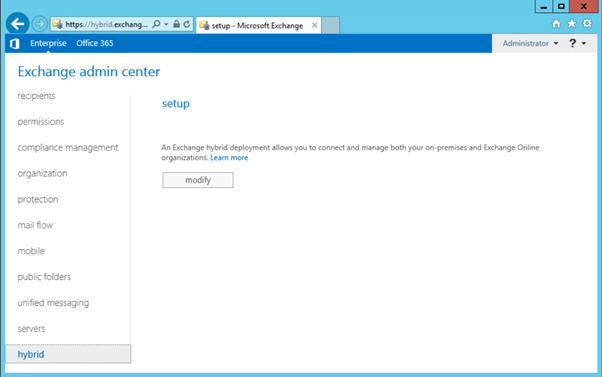
To install the new HCW and reconfigure the hybrid configuration, logon to the Exchange Control Panel and click Hybrid:

image

Continue reading New Hybrid Configuration Wizard

Autodiscover in a hybrid scenario

In the previous articles I showed you how to implement DirSync, create an Exchange hybrid environment with a migration endpoint and how to migrate Mailboxes from Exchange on-premises to Exchange Online. Not a single word on autodiscover though, and even when autodiscover is pointing to your on-premises Exchange environment, it continues to work for Mailboxes that have been migrated to Exchange Online. This is one of the advantages of an Exchange hybrid scenario.

This is what happens: when you move a Mailbox from Exchange on-premises to Exchange Online, the Mailbox on-premises is converted to a Mail-Enabled User (Remote Mailbox) and a target address is set to Exchange Online (i.e. user@tenantname.mail.onmicrosoft.com).

When an Outlook client does an Autodiscover request to the Exchange environment it detects the user is a Mail-Enabled User, and that a target address is set. Based on this target address a new Autodiscover request is initiated. So, Outlook does a request for a user called kim@exchangelabs.nl, Autodiscover returns a Mail-Enabled User with target address kima@exchangelabsnl.mail.onmicrosoft.com. Next, Outlook wil try an Autodiscover request for this SMTP address.

Continue reading Autodiscover in a hybrid scenario

Moving Mailboxes in a Hybrid Configuration – Part II

Before you start moving mailboxes you have to make sure that all accepted domains used by mailboxes on-premises are configured in Office 365. This can be tricky, you wouldn’t be the first admin that experience failed migration because of a domain.local email address on an on-premises Mailbox J

Now, when you want to move a mailbox from Exchange on-premises to Exchange Online, navigate again to the Exchange Admin Center, and under recipients select migration. Click the + icon and select migrate to Exchange Online to start the new migration batch wizard.

For the migration type, select Remote move migration which is supported by Exchange 2010 or later.

image

Click Next to continue. Select the mailboxes you want to migrate to Exchange Online, you can use the people picker feature (click the + icon under Select the users that you want to move) for this, or you can use a CSV file to select the mailboxes you want to move.

image

Continue reading Moving Mailboxes in a Hybrid Configuration – Part II

Moving Mailboxes in a Hybrid Configuration – Part I

In three earlier blog posts I explained how to implement directory synchronization and how to create an Exchange hybrid configuration:

These steps will create a hybrid configuration between your on-premises Exchange 2013 environment an Exchange Online, but to move mailboxes from Exchange on-premises to Exchange online (or vice versa) you need to create an endpoint. This an on-premises Exchange 2013 server (but it can be more) where the Mailbox Replication Service (MRS) is running, used to move mailbox data from one server to another. The process is similar to an on-premises mailbox move where the MRS is responsible.

Create a migration endpoint

To create an endpoint you have to go to the Exchange Admin Center in Office 365 and login as an Office 365 tenant administrator. You can get there via the Microsoft Online Portal, select Admin | Exchange, or navigate directory to the Exchange Admin Center, and login as an Office 365 tenant administrator.

In the Exchange Admin Center dashboard, under Recipients select migration. At this point an empty screen will be shown:

image

Continue reading Moving Mailboxes in a Hybrid Configuration – Part I