Tag Archives: hybrid

Exchange 2013 CU10

Microsoft silently released Exchange 2013 CU10 on September 15th 2015, right on track with their quarterly cadence, and as expected. There are no new features in this Cumulative Update, but besides a lot of hotfixes there’s also a change to RBAC which require changes to the Configuration Partition in Active Directory.

So, no changes to the Active Directory Schema, but you have to run Setup.exe /PrepareAD /IAcceptExchangeServerLicenseTerms before you start the actual setup. Please note that you have to do this, even if you run the GUI version of setup. If you omit this step the changes won’t be applied to Active Directory. As a result, the RBAC changes might not be available after your upgrade. A similar issue happened with CU9 as written down in this blog post MessageCopyForSentAsEnabled and MessageCopyForSendOnBehalfEnabled not available in CU9.

Before installing Exchange 2013 CU10 in your production environment I recommend testing it thoroughly in a lab environment. The last couple of CU’s have been pretty successful without too many issues, but there might be specific issues in your own organization that Microsoft is unaware of.

When upgrading DAG members please remember you disable all the Exchange server components as explained in my blog about deploying Exchange 2013 CU9.

You can download CU10 here, and the CU10 Language packs here. A complete list of issues resolved can be found in Knowledge Base Article KB3078678.

At the same time Microsoft released released Exchange Server 2010 Service Pack 3 Update Rollup 11 (KB3078674).

When Exchange 2016 is released in the (near) future, you will need Exchange 2013 CU10 or Exchange Server 2010 SP3 Update Rollup 11 for coexistence. This will be hardcoded in the product, so if you’re planning to deploy Exchange 2016 in the future you have to install these version.

Also, when you’re running an Exchange 2013 Hybrid scenario with Office 365 you have to use the latest version, so in this case Exchange 2013 CU10 is mandatory.
Exchange 2013 Hybrid Configuration Wizard (Part II)

In my previous blog post I explained about an Exchange 2013 hybrid configuration, and what the prerequisites are for such a configuration and how to implement and configure one (or more) Exchange 2013 Hybrid servers.

In this blog post we’ll continue with the Hybrid Configuration and we will run the Hybrid Configuration Wizard (HCW) to actually create the Exchange 2013 Hybrid configuration.

Note. For simplicity I assume your Exchange 2013 is fully operational without any (certificate) issues on the Internet, which means you have configured all your Virtual Directories, Outlook Anywhere and Autodiscover. Everything must be working correctly to prevent any issues during configuration, possibly resulting in a misconfigured and not working hybrid configuration.

Run the Hybrid Configuration Wizard

Configuring Exchange 2013 is relatively easy and can be started from the Exchange Admin Center (EAC). The wizard that’s used here is known as the Hybrid Configuration Wizard (HCW) and in my experience a very stable (although there have been some glitches with the HCW in earlier CU’s of Exchange 2013) and efficient wizard, providing you have met all prerequisites of course.

Login to the Exchange 2013 Hybrid server and start the Exchange Admin Center locally. The reason for doing this locally on the server is that during the wizard some additional software needs to be installed for the OAuth part of the Hybrid configuration.

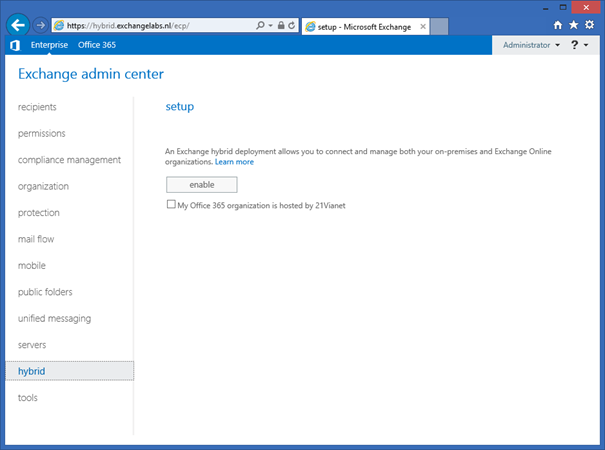
In the Exchange Admin Center in the navigation pane select hybrid. In the hybrid setup window click the enable button to initially enable the hybrid mode in your organization. The option My Office 365 organzation is hosted by 21Vianet should be left unchecked. Office 365 in China is hosted by 21Vianet so this option does not apply to us (unless you are in China and your organization is hosted by 21Vianet of course).

image

Continue reading Exchange 2013 Hybrid Configuration Wizard (Part II)

Exchange 2013 Hybrid Prerequisites (Part I)

Edited: November 11, 2015

In a hybrid environment the on-premises Exchange organization (which can be either Exchange 2010 or Exchange 2013) is integrated with Exchange Online. In a hybrid configuration you basically create one ‘virtual’ Exchange organization with the following features:

  • One cross-premises Address Book;
  • Secure cross-premises mail flow;
  • Cross-premises Free/Busy information, mail tips and out-of-office features;
  • Seamless migration to Exchange Online and vice versa;
  • No recreation of OST file;
  • Automatic reconfiguration of Outlook profile;
  • OWA URL Redirect.

To create a Hybrid environment you need at least one Exchange hybrid server on-premises. This can be an Exchange 2010 server but I always recommend using an Exchange 2013 server for this because of the improved hybrid connectivity in Exchange 2013. For redundancy purposes (and performance for larger environments) you better use multiple Exchange 2013 Hybrid servers.

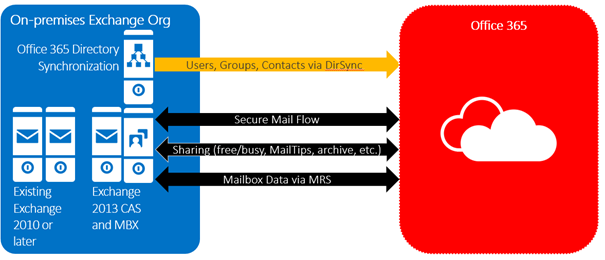
Another prerequisite for creating a Hybrid environment is that you must have Directory Synchronization in place, so DirSync is used for synchronization user accounts, groups and contacts, all other communication is handled by the Exchange 2013 hybrid servers as shown in the following picture:

image

Continue reading Exchange 2013 Hybrid Prerequisites (Part I)

The operation on mailbox failed because it’s out of the current user’s write scope

When you want to change an email address on a Mailbox in Office 365 you get the following error message:

The operation on mailbox “<mailbox>” failed because it’s out of the current user’s write scope. The action ‘Set-Mailbox’, ‘EmailAddresses’, can’t be performed on the object ‘Stacey Brown’ because the object is being synchronized from your on-premises organization. This action should be performed on the object in your on-premises organization.

image

This issue is caused by the fact you’re synchronizing user objects from a local Active Directory using DirSync or WAADSync, and you want to change properties in Office 365. This is not possible since the Source of Authority is your local Active Directory, and not Windows Azure Active Directory. This means you have to change all the user’s properties in Active Directory, including his email address.

Continue reading The operation on mailbox failed because it’s out of the current user’s write scope

The Secure Mail Certificate on server HYBRID01 is not bound to the SMTP Service

While configuring an Exchange 2013 organization in a hybrid scenario with Office 365 the Exchange Hybrid wizard stopped and showed the following error message:

Subtask CheckPrereqs execution failed: Configure Mail flow The Secure Mail Certificate on server HYBRID01 is not bound to the SMTP Service at Microsoft.Exchange.Management.Hybrid.MailFlowTask.CheckCertPrereqs()…

image

Continue reading The Secure Mail Certificate on server HYBRID01 is not bound to the SMTP Service